What an n8n Consultant Does in the First Two Weeks, Day by Day
What an n8n consultant delivers in two weeks. Access, inventory, a ranked risk list, error alerts and fixes, with real audit findings and typical rates.
By Carlos Familia, CRM & AI automation expert. Updated . 7 min.
A mortgage brokerage in Florida told me its WhatsApp lead alerts had stopped. The workflow step that sent them kept logging "accepted" for days. The platform had actually lost access to the WhatsApp Business Account after the office phone line moved to another system. I replaced that alert with an SMS alert, and the first real lead after the switch reached 4 staff phones.
That account is the kind of job an n8n consultant exists for: things that die in silence. A consultant reviews what already runs, ranks what is likely to fail, and puts alerts and fixes in place. Over two weeks you should receive four things: an inventory of every workflow, a ranked risk list, error alerts that reach a person, and the first fixes.
On MentorCruise, freelance n8n experts are listed at $60 to $200 or more per hour for session-based work, with $110 labeled the most common. MentorCruise sells those sessions, so read that as one marketplace's listing, not the market rate. For project ranges and running costs, see how much does an n8n developer cost.
Below is the plan I use for two weeks on an account I did not build. It is a schedule, not the diary of one job. The findings I use as examples come from separate pieces of work, mostly for that same brokerage, and are labeled where they appear.
| Consultant | Builder | |
|---|---|---|
| Starting point | What already runs | A new requirement |
| Main output | Inventory, risk list, monitoring | Working workflows |
| Success looks like | Fewer silent failures | A feature that works |
| Question it answers | What will break next? | Can you connect X to Y? |
Day 1: access and one question
I ask for read access to workflows and executions, a list of credential names (never the secrets), and the name of whoever owns the instance. Write access waits until the fixes start.
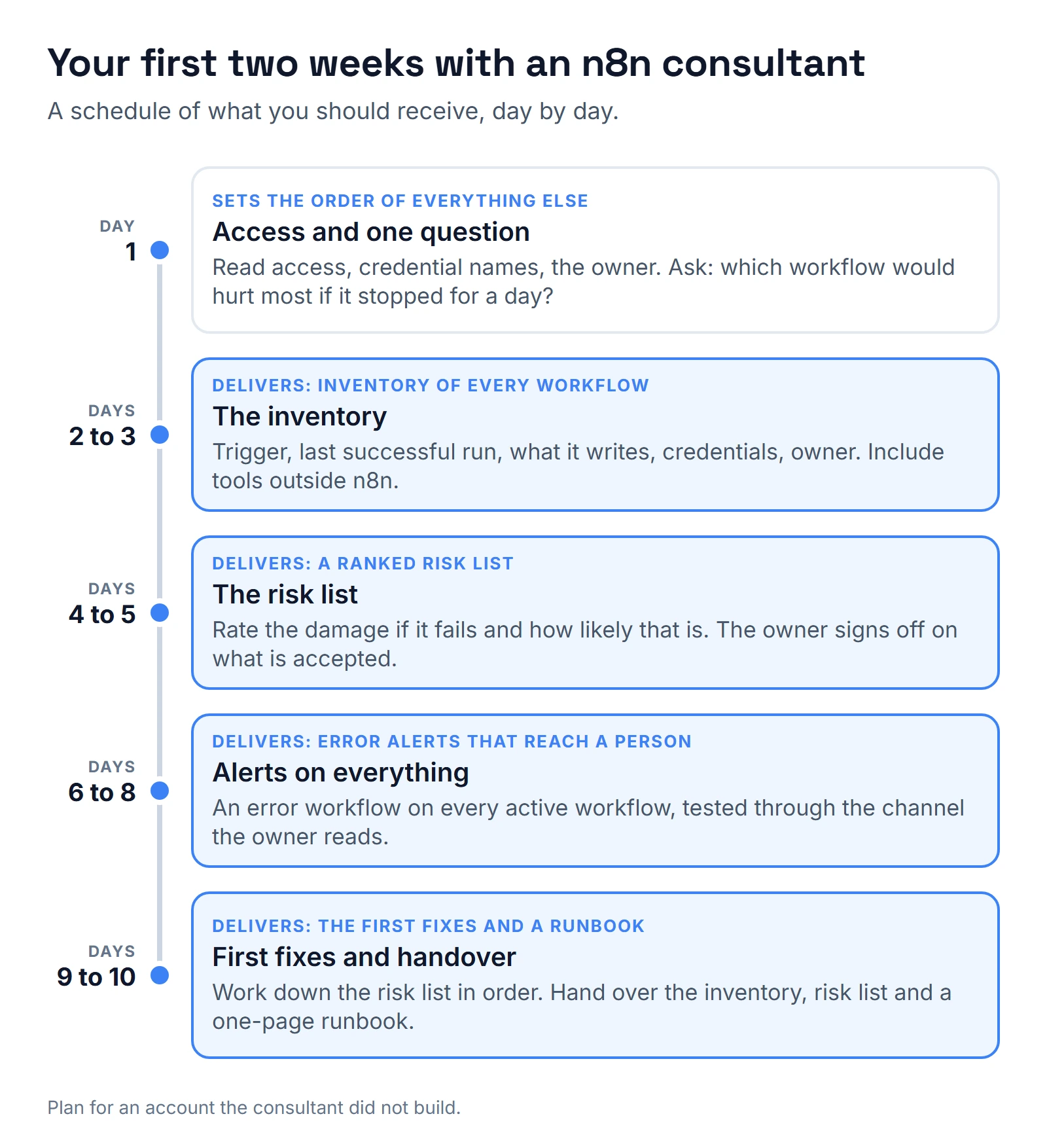
Then one question for the owner: which workflow would hurt most if it stopped for a day? The answer sets the order of everything else.
I also check how far back the execution history reaches. On one instance, a test running every few seconds flooded it until only about two days remained. A short history hides slow failures, and a missing history means nobody can prove what ran.
Days 2 and 3: the inventory
For every workflow I record the same fields. Each column exists because its absence cost someone something.
| Column | Why it is there |
|---|---|
| Trigger | A workflow can be active and never fire. |
| Last successful run | At the brokerage, a refinance watcher had been off since July. |
| What it writes, and to which fields | The same watcher read different field IDs than the ones staff filled in. |
| Credentials used | An expired credential fails every workflow that shares it. |
| Who owns it | The brokerage had 24 hardcoded assignees to replace (see the fixes below). |
Two traps make the inventory harder than it looks. A trigger can show as active and still be dead: after a partial save on a running workflow, its webhook can stay unregistered until the workflow is switched off and on again, so I fire a real test event. And the executions list is not the full truth. Runs paused in a Wait step for longer than about 65 seconds were missing from it.
The inventory also covers tools outside n8n that feed the same systems. That mattered at the Florida brokerage, in a separate piece of work. Its lead bridge to the loan origination system (LOS) ran as six Zaps in the owner's personal Zapier account. Zap filters dropped 9 records in 7 days, and Zapier recorded them as successful runs.
An n8n-only inventory would have missed it. I cover that move in n8n vs Make vs Zapier.
Days 4 and 5: the risk list
Each item gets two ratings: the damage if it fails, and how likely that is. The list is short and blunt.
Here is the kind of finding that goes on it. The brokerage owner once asked me whether the refinance rate watcher was built well. That review found nine problems:
- The daily job had been off since July.
- The texts quoted a stale market rate.
- The function read different field IDs than the ones staff filled in.
- The alert only ran for contacts with one ad-source tag.
- No default target existed.
- "Monthly" actually ran every 90 days.
- Test contacts sat inside the live watcher.
- Recently funded loans were not excluded.
- Nothing stamped the alert date.
Rated with this method, the stale rate in customer texts and the job that was off since July go to the top, because both reach customers and neither shows an error. The missing date stamp goes to the bottom. In the plan, not every item gets fixed. The owner signs off on the ones we accept, and they stay on the list with that status.
The fix at the brokerage was a daily job that pulls published market rates, a default target of the note rate minus 0.50, a skip for loans funded in the last 180 days, a 30-day cooldown and an alert date stamp. The first real run wrote 4 contacts.
Days 6 to 8: alerts on everything
n8n's documentation describes an error workflow as one that starts with an Error Trigger node and runs when another workflow's execution fails. You attach it in each workflow's settings. The trigger receives the execution ID and URL, the error message, the last node that ran and the workflow's name. That is enough to write an alert a non-technical owner can act on.
When I set this up at the brokerage, it went on every active workflow, 33 out of 33. It sends one alert per workflow, step and error, and repeats stay quiet for 30 minutes, so a broken step produces one message, not a flood. A second job runs every hour and looks for workflows that were switched off or schedules that did not fire.
Two traps to know. The error workflow itself has to be published, or it never runs, so prove it by breaking something on purpose. And the alert channel can fail too, which is exactly what the WhatsApp step did. Send a real test alert through the same channel the owner will actually read.
Days 9 and 10: the first fixes and the handover
I work down the risk list in order. Two fixes from the brokerage show the kind of work that lands here.
- Task ownership. 24 hardcoded assignees across 12 workflows became "the contact owner", with one assignment workflow.
- Language tags. Mixed language tags had sent Spanish reminders to English speakers. I moved 33 contacts to a single language tag.
A review also checks the numbers people trust. The brokerage's metrics were verified three times against an independent script, and that check exposed 111 open opportunities stuck in the Funded stage.
When a fix touches a live workflow, I start from the version that is actually running, diff it against the saved copy, and resend anything that arrived during the change. A saved draft can differ from what is running.
Then comes the handover. You should end up with:
- An inventory sheet.
- The risk list, with a status on each line: fixed, open or accepted.
- Proof that the alerts fire, including the test through the real channel.
- A one-page runbook that says where everything runs, who has access and how to pause all of it.
If the next step is a new build rather than a review, use the eleven questions I ask before anyone hires an n8n developer. If you are weighing a studio against one specialist, the trade-offs are in n8n automation agency myths. AI agents get extra checks, drawn from the n8n AI agent failures I hit in production.
Who reads the alerts after day 10?
The alerts only work if a named person reads them. Ask the owner to name that person and a backup, and to confirm that each has received a test alert.
The hourly check for switched-off workflows keeps running after the review ends. So does the 30-minute quiet period on repeats. If nobody owns the channel, even good monitoring turns into a muted channel.
What would I change in this plan?
I would move a basic failure alert to day 1, before the inventory is finished. The WhatsApp step shows what silence costs: days of a green status while leads went unseen.
I would also put the tools outside n8n at the front of the inventory, not the end. The silent Zapier filters are the finding I would least want to miss, and an inventory that stopped at n8n would never show them.
Third, I would ask for the named person who reads alerts on day 1, not at handover, so every test alert in between reaches the right phone. If you want this done on your account, the calendar below is the next step, or you can book a call directly.
About the author

Carlos Familia, CRM & AI automation expert. GoHighLevel, n8n, AI agents, servers. Full-stack developer.
I build CRM systems in GoHighLevel, n8n automations on my own servers and AI voice and chat agents for service businesses. Full-stack developer: I write the workflow, the API integration, the database and the server it runs on, and I test every build with real journeys before handoff.
Book a call with Carlos
In 30 minutes we look at how you get customers today and what to automate first. Pick a time · contact@bluemiraisystems.com