n8n AI Agent Mistakes I Made in Production and What They Cost
Fourteen n8n AI agent mistakes I made running chat bots for real businesses, what each one cost, how I found it and the fix I use now. No demo-only advice.
By Carlos Familia, CRM & AI automation expert. Updated . 9 min.
A client of a med spa in New Jersey showed up for an appointment that did not exist. The booking bot I had built told the lead "moved you to Friday", made zero tool calls, and got the weekday wrong. The calendar never changed. That one message taught me more about production AI agents than any demo did.
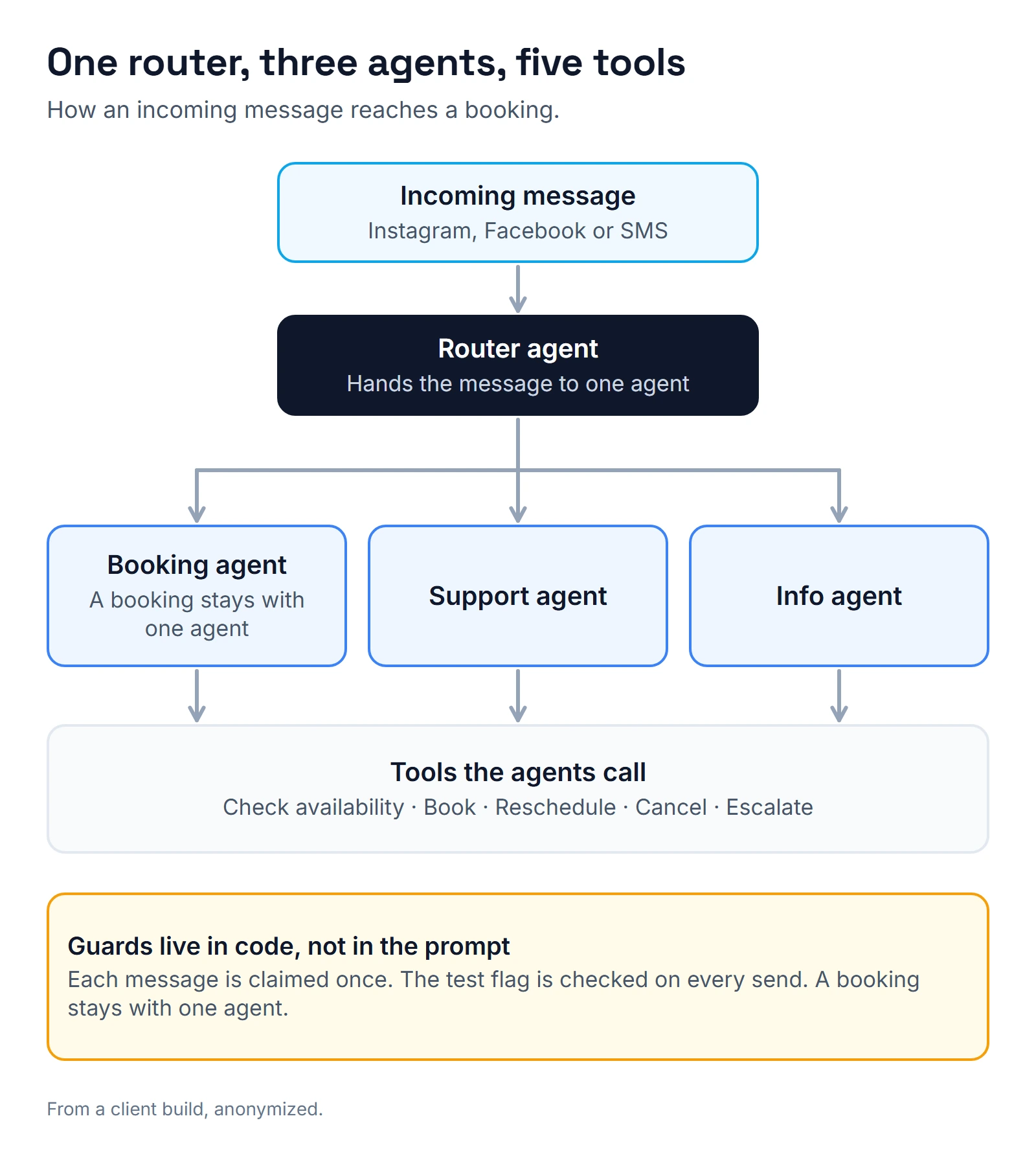
An n8n AI agent rarely fails because of the model. It fails in the plumbing around it: tool results, connections, clocks, duplicate messages and edits. n8n's documentation describes the AI Agent node as a chat model plus one or more tools, where the agent decides which tools to call. On the med spa bot, a router agent hands each message to a booking, support or info agent, and those agents call tools to check availability, book, reschedule, cancel and escalate.
Everything below is a mistake I made on chat bots for a med spa and a facial spa in New Jersey and a roofing contractor in Kentucky, plus one follow-up launch for a med spa in Pennsylvania, across Instagram, Facebook and SMS conversations. Each has what it cost, how I found it where I know, and the fix.
Mistake 1: I let the bot say it had done something
What it cost: a client who arrived to no appointment.
How I found it: the client turned up for an appointment that was not on the calendar. The run behind that message had made zero tool calls.
The fix: tools now return a weekday table, so the model never computes a weekday, and a change counts as real only when the tool call succeeds. If the reply says "done" and the run shows no successful tool call, that is a bug. The same lesson applies to phone agents, which I cover in how do AI receptionists work.
Mistake 2: I trusted a prompt rule to control behavior
What it cost: a bot that asked for a time in every reply, whatever the prompt said.
The fix: a counter in code. The prompt rule came first and did not hold, so the ask budget moved into a node, where it did. Prompts are suggestions. Anything that must never happen, or may happen only a limited number of times, belongs in a node.
Mistake 3: I could not see what the tools returned
What it cost: invented answers. On the med spa bot, n8n's HTTP tool node threw "Invalid URL" on every call, and I moved the tools to a Code Tool. On the facial spa router, which I had built from raw REST calls, every tool result reached the agent as an empty string. The agent invented times, prices and bookings.
The fix: I cloned a working workflow instead of building from raw calls. Open a real execution and read the tool result before you trust anything else, because a bot with blank tool results still sounds confident.
Mistake 4: I let the server clock decide what today is
What it cost: a booking on the wrong day. On the facial spa bot, "tomorrow (Saturday)" booked today, because the tool had no date parameter and $now in prompts uses server time, which is UTC. In US time zones, "today" is wrong every evening.
The fix: tools take explicit dates and return weekday tables, and the voice agent for the same spa got a server-side resolver for relative days. Never let the model compute a weekday.
Mistake 5: I rebuilt the connections and wiped the agent's brain
What it cost: a rename script rebuilt the workflow's connections with only the main data flow. It wiped 23 AI connections: the model, the memory and the tools. Executions still showed success. Six real leads got the fallback reply for about an hour.
The fix, and the check to ask for: after any scripted change, count the AI connections and run a test chat that must call a tool. Green executions prove nothing here. Hire n8n developer interview questions include how a builder deploys changes.
Mistake 6: I patched from the draft
What it cost: 15 minutes of downtime. A GET on a workflow returned the saved draft, not what was running. I patched from it and published stale code over the live router.
The fix: I patch from the published version, compare what actually ran against what is saved, and replay any messages missed during the change. One more trap on the same path: saving only part of a running workflow can leave its webhook unregistered, and the agent then hears nothing until the workflow is switched off and on.
Mistake 7: I let two runs answer the same message
What it cost: double replies. Overlapping scheduled polls both saw the same message as new, because n8n's static data commits only when an execution ends. A poll that hardcoded one conversation also went silent when I deleted a test contact.
The fix: each message is claimed atomically in a database table before anything is sent, and I replaced 30-second polling with the marketplace's incoming-message webhook. I also added a pre-send guard against double messages. My first guard on the facial spa bot compared nothing, because a field was null, so it blocked nothing. Test a guard with a case that must be blocked.
Mistake 8: I sent a mid-booking message to an agent with no booking tool
What it cost: silence. The router sent a mid-booking message to an agent that had no booking tool. It hit its maximum iterations and never answered.
The fix: sticky routing, so a booking conversation stays with one agent. Every agent can now book, and a fallback reply exists for when anything runs out of iterations.
Mistake 9: I checked test mode too late
What it cost: a test-mode string reached a real lead on a roofing contractor's bot in Kentucky.
The fix: a test flag checked only at the end of a run is a report, not a guard. Every step that writes or sends checks it, and if the flag cannot be read, the run stops. The med spa bot also got a tester whitelist.
Mistake 10: I let the calendar's rules stand in for the business's rules
What it cost: wrong offers. The med spa calendar had empty opening hours, so the bot offered days the spa was closed. Later the calendar lost its team member and returned a 422 error. On the facial spa bot, a real client was booked on a Sunday because one staff member's schedule in Square had Sundays open.
The fix: hours and team members are set explicitly, and policy lives in the tool. The facial spa bot now has a tool-level Sunday filter. A booking bot obeys the calendar, not your policy, so anything the business refuses to offer has to be enforced where the offer is built.
Mistake 11: I replied to a contact that was about to disappear
What it cost: replies to nobody. Facebook lead-form leads create two contacts, and the CRM merges them 1 to 2 seconds after the webhook arrives. A fast reply went to the contact that was about to be deleted.
The fix: wait briefly, then look the contact up again by phone or email before replying. A related trap sits in the incoming-message webhook, which has no attachments field. Two of 7 Instagram story replies were real leads, so I filter on intent, not on message type.
Mistake 12: My reactivation tagger tagged the wrong people on its first run
What it cost: 8 wrong tags. The tagger on the med spa bot re-engages quiet leads at 15 minutes, 24 hours, 2 days and 7 days, with a refusal guard and a business-hours gate. Its first run tagged 94 contacts, and 8 of them were wrong. I cleaned them up, and the second run tagged 1 contact with 0 leaks.
The fix: read the first run's output by hand before trusting the second. For the facial spa the tagger respects Meta's 24-hour messaging window and stops at 4 touches per lead, and its first run tagged 68 backlog contacts.
On the Pennsylvania med spa, a cloned follow-up ladder would have messaged 38 of 100 conversations that staff had written themselves. A launch cutoff stopped that.
Mistake 13: I let the agent guess names and emails
What it cost: wrong matches. On the facial spa bot, the support agent invented an email address to search for a client. A synonym map from the marketing name of a service to the catalog name ran backwards and matched a $350 service.
The fix: the Square tools now load the live service catalog and team list, match names fuzzily, validate slots hard and look up customers fuzzily. A lookup should run on what the client actually wrote, never on an email the model made up.
Mistake 14: I filtered to social channels and left SMS unanswered
What it cost: unanswered texts. I had filtered the facial spa bot to social-only conversations, which meant leads who wrote by SMS got nothing.
The fix: answer on every channel the business uses, and send one test message per channel before go-live.
Which of these should you check first?
If you already run an agent, start with four, because each one reached real customers on a real account.
Do replies claim an action without a successful tool call (mistake 1)? Are the AI connections still attached after the last edit (mistake 5)? Can any step send while in test mode (mistake 9)? Can two runs answer the same message (mistake 7)?
The other ten matter too. These four are quick to test.
What do I do now to catch these early?
Before I built the med spa bot, a watchdog measured the baseline: median first response of 36 seconds, a 90th percentile of 73 minutes, and 2 leads in 14 days never answered. Without that, I could not have said whether the bot helped.
Now each bot is watched after launch. For a marketing agency with nine client bots, a Slack supervisor posts a digest three times a day. On its first run it flagged a classifier that was answering with 403 errors. Another time it skipped one client without a word, because that client's logs used different columns, so each client now gets its own adapter.
The agency's master rules for the bots cover structured output, pipeline moves, a wall against medical questions and proof of handoff, and an audit of those rules found 138 gaps. QA on the med spa work scored 102 of 105 tests. And I no longer test on a seconds-level schedule, because one test flooded an instance's execution history down to about two days.
If you are hiring someone to build an agent, ask them these six questions:
- Can I see a real tool result in an execution?
- Which limits are enforced in code, not in the prompt?
- How do you count the model and tool connections after an edit?
- How do you patch a running workflow?
- What happens when two runs see the same message?
- Who sees the first run before it reaches customers?
Not every bot runs on Instagram or Facebook. For WhatsApp builds, see n8n whatsapp integration. For where GoHighLevel stops and n8n starts, see gohighlevel n8n. If you already run bots nobody checks, an n8n consultant review finds the silent ones, and how much does an n8n developer cost covers the budget side.
To go through your own agent, use the calendar below or book a call.
About the author

Carlos Familia, CRM & AI automation expert. GoHighLevel, n8n, AI agents, servers. Full-stack developer.
I build CRM systems in GoHighLevel, n8n automations on my own servers and AI voice and chat agents for service businesses. Full-stack developer: I write the workflow, the API integration, the database and the server it runs on, and I test every build with real journeys before handoff.
Book a call with Carlos
In 30 minutes we look at how you get customers today and what to automate first. Pick a time · contact@bluemiraisystems.com