RingCentral GoHighLevel Integration: My Click-to-Dial Build Diary
A GoHighLevel RingCentral integration from a real build diary: click to dial with RingOut, every call logged on the contact, and the refresh token trap.
By Carlos Familia, CRM & AI automation expert. Updated . 10 min.
A mortgage loan officer in California made every call from RingCentral. His GoHighLevel sub-account had no phone system connected, so the call button on a contact went nowhere, and none of his calls showed up in the CRM. He wanted two things. Click a number in GoHighLevel and have his own phone ring, then see every call on the contact afterward. I built the call log in February 2026 and the click to dial in July.
Can you integrate RingCentral with GoHighLevel? Yes, but not natively. GoHighLevel's own dialer and texting run on its LC Phone system or a connected Twilio account, so RingCentral connects from the outside. You have four realistic routes: RingCentral's App Connect connector for HighLevel, Zapier, a direct build on RingCentral's official REST API (mine, with n8n in the middle), or moving your calling into GoHighLevel. A fifth, a marketplace app that writes native call entries, is developer work. If you only need calls listed on contacts, start with App Connect or Zapier. Build on the API when the call has to start from GoHighLevel's own buttons.
What are the ways to connect RingCentral and GoHighLevel?
| Route | What it syncs | Cost driver | Setup effort | What breaks |
|---|---|---|---|---|
| Native setting in GoHighLevel | Nothing; there is none | None | None | Nothing to break |
| RingCentral App Connect, HighLevel connector | Call logging from a dialer in a Chrome extension | Paid, sold by a third-party partner | Low | Its doc's feature sections were empty when I read it, so test first |
| Zapier with the RingCentral and LeadConnector apps | Ended and missed calls to contacts; a RingOut call as an action | Zapier tasks | Low to medium | No search or note action on the GoHighLevel side |
| n8n with RingCentral's REST API and HighLevel's API | Click to dial from GoHighLevel, every finished call as a note | Your server and build time | Days | Token rotation, subscription expiry, contact matching |
| A marketplace app as a call provider | Calls as real call entries in the conversation | Development time | High | It logs calls; it cannot place them |
| Move calling to LC Phone or Twilio | GoHighLevel's own dialer, recordings, call triggers | Per-minute usage | Porting numbers | Leaving RingCentral |
RingCentral's App Connect page for HighLevel says RingCentral supports HighLevel through a third-party partner and that the connector costs extra. Zapier's RingCentral guide (updated October 1, 2026) lists Call Ended and Missed Call triggers and a Generate Ringout Call action. Its LeadConnector guide lists no search actions and no note action, which is why the Zapier route struggles to put a call on the right contact.
The rest of this post is the diary of the API build.
February 3, minute 0: version 1 listens for calls
All five versions of the call log were saved within about an hour on February 3, 2026, so this part of the diary runs in minutes. Each minute below is when that version's file was saved, counted from the first. Version 1 needed three pieces, all official:
- An app. In RingCentral's developer console, create a REST API app, make it private to your own account, and add the permissions you need. A call log needs Read Call Log and Webhook Subscriptions; click to dial also needs RingOut.
- Auth. The call log is a server job with no person signing in, so I used RingCentral's JWT flow (updated June 29, 2026). The JWT is presented again whenever a fresh access token is needed.
- A subscription. You register your n8n URL for the events you want, and RingCentral posts each one there.
Minute 19: version 2 adds the handshake
Version 1 had no answer for RingCentral's check. RingCentral's webhook guide (updated October 9, 2026) says it sends a Validation-Token header when a subscription is created, and your endpoint must echo it back in its own response header. Version 2 added an IF node that looks for the header and a Respond to Webhook node that returns it.
My subscription was set to expire after 7 days. The same guide says each PUT on a subscription renews it, and that a reminder event can warn you before it lapses. Put renewal on a schedule on day one, not after the first silent week.
Minute 31: version 3 keeps finished calls only
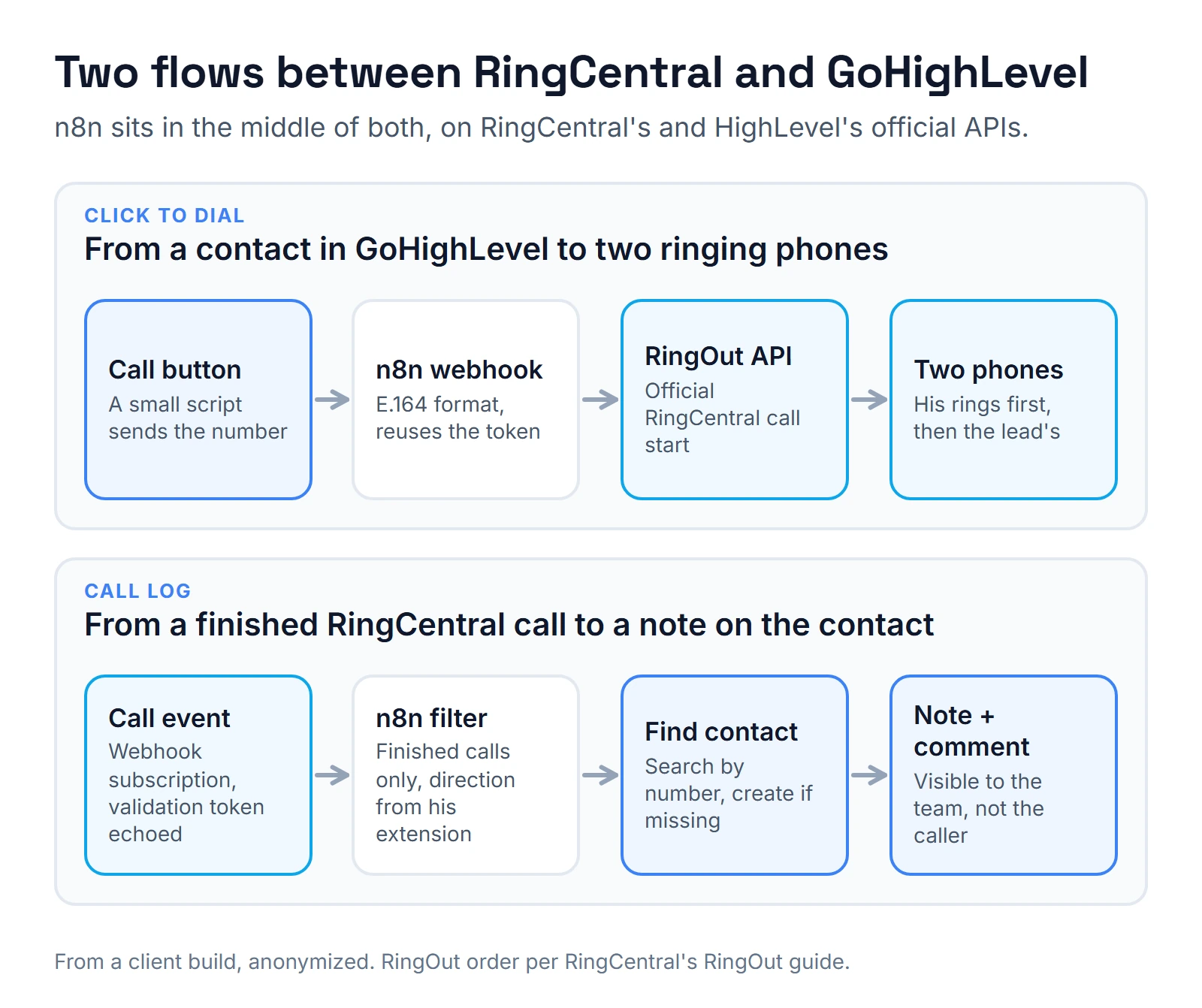
A single call produces several events as it rings, connects, holds and ends. Version 3 skips every status except finished ones: disconnected, gone or voicemail. Without that filter, one call would have written several notes.
Minute 53: version 4 reads direction and tries a "Call" message
Version 4 took the direction from the party that belongs to the loan officer's own extension. On an outbound call, the other person's number is in "to". On an inbound call, it is in "from". Reading whichever party comes first in the list can point the wrong way.
Version 4 also tried to post each call into the contact's conversation as a message of type Call. GoHighLevel answered "Conversation with id providers not found". HighLevel's conversation providers docs explain it. A Call message needs a conversationProviderId, and call providers are created inside a marketplace app. They add call logs to conversations but cannot place or receive calls.
Minute 64: version 5, a note and an internal comment
Version 5 stopped fighting that and did four things:
- Search the contact by phone with HighLevel's duplicate-contact search. The query parameter is number, not phone. Sending phone returned a 422 saying the property should not exist.
- If nobody matched, create the contact. When the search missed a contact that did exist, the create failed with "This location does not allow duplicated contacts", so the workflow handles both answers.
- Write a note: date, direction, number, duration and result.
- Add an internal comment to the conversation, so the team sees the call in the inbox. HighLevel's message webhook docs say internal comments are only visible to internal users and are not sent to the contact.
Version 5 is the one that ran, and I later reused it as the skeleton for a nightly call digest from another phone system for a real estate wholesaler.
July 1: click to dial with RingOut
RingOut is RingCentral's official way to start a call from software. Its RingOut guide (updated June 29, 2026) describes the order: RingCentral calls your phone first, then connects you to the destination. The destination number is required, both numbers go in E.164 format, and a playPrompt setting decides whether you must press 1 before it connects. The status comes back as InProgress, Success or CannotReach.
The build:
- A RingCentral app with the RingOut permission, authorized once by the loan officer with RingCentral's authorization code flow (updated October 9, 2026). The redirect address must match the one registered on the app exactly.
- An n8n webhook that receives the contact's number, formats it as E.164 and calls RingOut with his cell phone as "from" and no press-1 prompt.
- On the GoHighLevel side, a small script added through GoHighLevel's custom JavaScript setting sends the contact's number to that webhook when he clicks call.
His phone rings, he answers, and then the lead's phone rings. One detail mattered more than I expected: every path in n8n returns JSON, errors included. An empty response made the button's script fail with a parse error instead of a readable message.
July 3: the refresh token that replaces itself
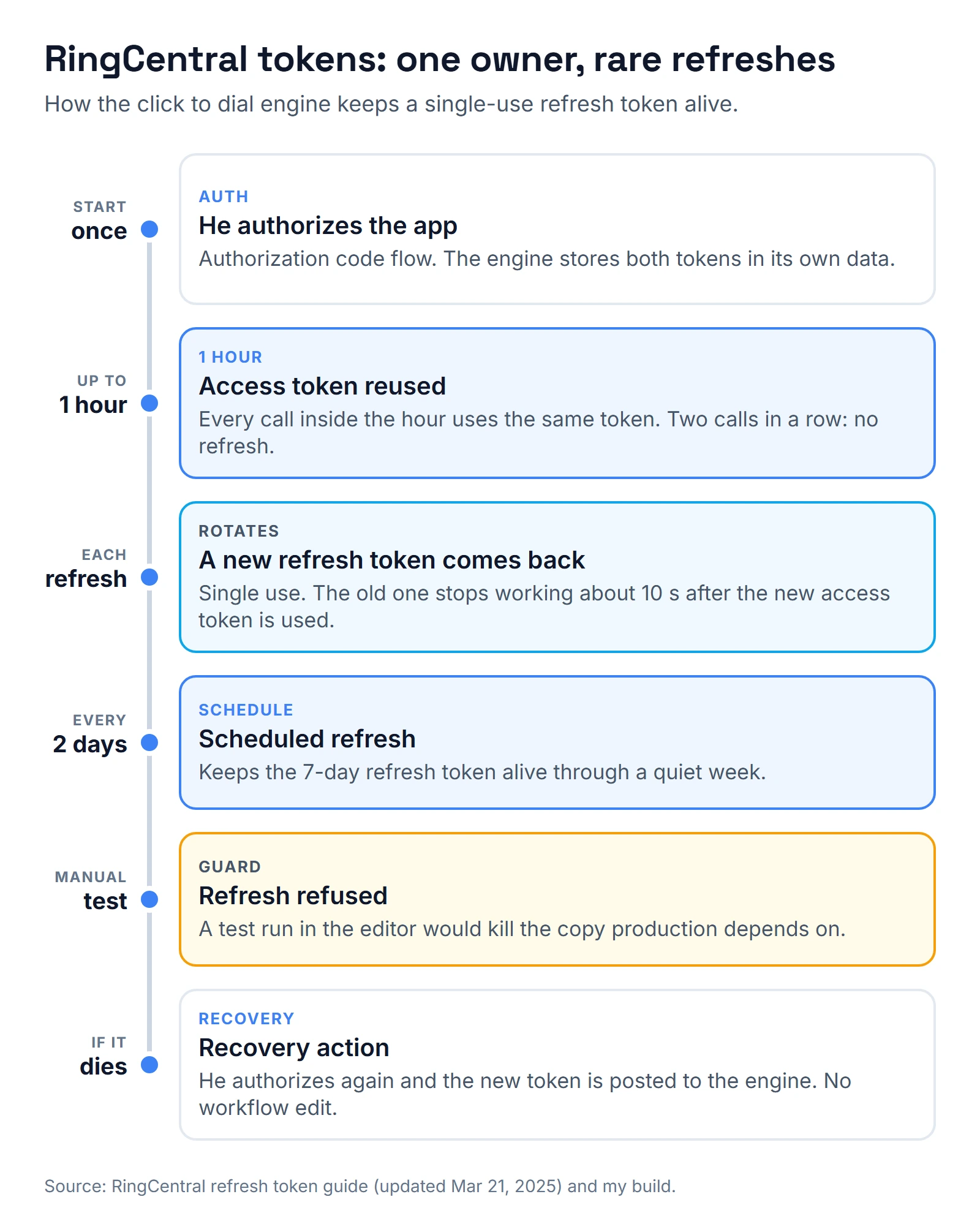
This is the trap that can kill the dialer overnight. RingCentral's refresh token guide (updated March 21, 2025) gives access tokens 1 hour and refresh tokens 7 days. Refresh tokens can be used once. A new one is usually issued on every refresh, the old access token dies at once, and the old refresh token stops working about ten seconds after the new access token is used.
So any second process that refreshes, including a test run, quietly kills the copy production depends on. Here is how the engine handles it:
- One owner. One code step in one n8n workflow holds the tokens in the workflow's own stored data. RingCentral's guide recommends a single service for refreshing in apps that share a token.
- Refresh rarely. The access token is reused for up to an hour. Two calls in a row did not trigger a refresh.
- Keep it alive. A schedule refreshes every 2 days, so the 7-day refresh token never lapses if he takes a week off.
- No test refreshes. The engine refuses to refresh during a manual run in n8n's editor. Testing goes through the real webhook.
- A way back. A recovery action accepts a new refresh token after he authorizes again, with no edit to the workflow.
One setting to check first: the guide says refresh tokens are not issued by default, so turn on "Issue refresh tokens" in the app's settings.
How do I test it before I trust it?
- Click to dial: call a number you own from a test contact. Then call twice in a row and confirm the second call did not refresh the token.
- Health check: the engine has a status action that reports the token's state without calling anyone.
- Call log: make one inbound and one outbound call to a test number. Check that the note sits on the right contact with the right direction and duration, and that an unknown number creates one contact, not two.
- Subscription: list your RingCentral subscriptions and read their status and expiry date. RingCentral's webhook troubleshooting page says an endpoint that fails to answer 200, or goes down for long, can get its subscription flagged as Blacklisted, and then events stop. The fix is a new subscription.
I test the GoHighLevel side with the same habits I describe in how I test GoHighLevel workflows.
Should you build this yourself?
If you only need calls listed on contacts, try App Connect or Zapier first, and compare the cost with your time. Build on the API when click to dial must start inside GoHighLevel, when calls must land as notes the team uses, and when someone will watch the tokens.
For the n8n side of a build like this, see my guide to the n8n GoHighLevel integration. The rest of this loan officer's setup is the kind of work in mortgage CRM, and if you are hiring for it, my mortgage GoHighLevel expert questions apply. If you might leave RingCentral, read connecting Twilio to GoHighLevel first, and for the Zapier route, my notes on the GoHighLevel Zapier integration.
What would I change?
- Try JWT for the dialer too. The call log used a JWT, which RingCentral says can simply be presented again for a fresh access token, so there was no single-use refresh token to babysit. For a private app on one account, I would test that first.
- Renew the subscription on a schedule. Or set its expiry far out; RingCentral's webhook guide says a far enough expiry date effectively never expires.
- Use HighLevel's upsert. HighLevel's Upsert Contact follows the location's duplicate settings, which would replace my search, create and retry logic.
- Alert on CannotReach. Today an error shows up as a message on the loan officer's screen. A RingOut that ends as CannotReach should also reach me.
Want me to connect RingCentral for you?
I build this integration for teams who make their calls in RingCentral and keep their leads in GoHighLevel: click to dial from the contact, every finished call written to the right record, and the token and subscription watched so it doesn't die in a quiet week. Book a slot on the calendar below and tell me how your team calls today. If App Connect or a Zap already covers what you need, I'll say so on the call instead of selling you a build.
About the author

Carlos Familia, CRM & AI automation expert. GoHighLevel, n8n, AI agents, servers. Full-stack developer.
I build CRM systems in GoHighLevel, n8n automations on my own servers and AI voice and chat agents for service businesses. Full-stack developer: I write the workflow, the API integration, the database and the server it runs on, and I test every build with real journeys before handoff.
Book a call with Carlos
In 30 minutes we look at how you get customers today and what to automate first. Pick a time · contact@bluemiraisystems.com