7 Leaks in a GoHighLevel Google Ads Conversion Tracking Setup
GoHighLevel Google Ads conversion tracking, torn down: click IDs, the Add to Google Ads action, number pool call tracking and the trap that counts one call twice.
By Carlos Familia, CRM & AI automation expert. Updated . 10 min.
I opened the conversion tracking of a dental implant practice and found that Google Ads had recorded 5 form conversions and 1 phone call from 189 clicks in a week. The practice was paying for every click, and Google's bidding was learning from almost nothing. In GoHighLevel there was a workflow named "Google Ads > lead form submission conversion". It was published. It had no trigger, so it had never sent a single conversion.
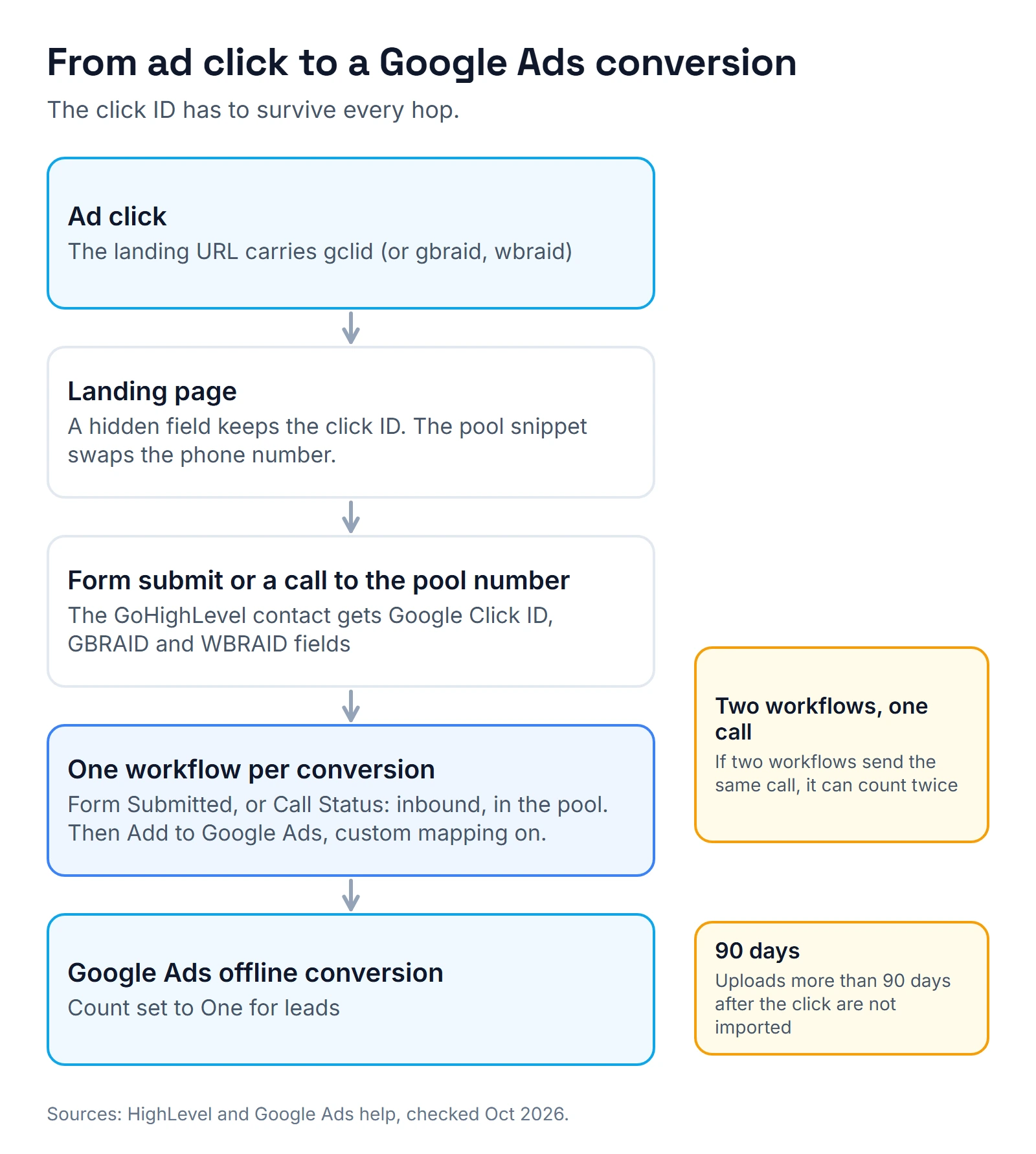
How do you send Google Ads conversions from GoHighLevel? Connect Google Ads under Settings, Integrations. Create an offline conversion action in Google Ads. Capture the click ID (GCLID, or GBRAID and WBRAID) on the contact, and send the conversion with the Add to Google Ads workflow action. For phone calls, put a GoHighLevel number pool on the landing page and fire the same action from a Call Status trigger filtered to inbound calls on that pool. Send each conversion from one workflow only, or a single call can count twice.
Which ways can GoHighLevel report conversions to Google Ads?
| Method | What it reports | Cost driver | Setup effort | What breaks |
|---|---|---|---|---|
| Add to Google Ads workflow action | Any CRM event as an offline conversion: form, call, booking, sale with value | HighLevel's article mentions no fee | Medium | No click ID on the contact, or a conversion name that doesn't match |
| HighLevel Ad Manager offline conversions | Offline conversions set up inside HighLevel's Ad Manager | Part of Ad Manager | Low | I have not used it in a client build |
| A Google Tag Manager tag on a thank-you page | Form submits as website conversions | Free | Medium | Lost when the redirect fails; no sale or booking data |
| A custom build on the Google Ads API (n8n, code) | Anything | Build and upkeep | High | You own every change Google makes |
HighLevel's conversion action setup guide (updated March 24, 2026) says HighLevel supports offline conversions only, so website, app and phone call sources inside Google Ads are not the ones to pick. Calls reach Google as offline conversions too, through the workflow.
What did I find, and how many times?
| What I found | Count |
|---|---|
| Conversion workflow published with no trigger | 1, skipped for every contact in its log |
| Click ID fields on the landing page form | 0 |
| Click IDs mapped in the Add to Google Ads step | 0 of 3; custom mapping was off |
| Conversion values for the same lead | 2: $200 in Tag Manager, $250 in GoHighLevel |
| Calls from the website that were tracked | 0; only calls from the ads themselves |
| Tag Manager container warnings | 1 |
| Google Ads conversion actions marked "Needs attention" | 1 |
Leak 1: a conversion workflow with no trigger
Why it happens. Usually someone builds the action, publishes, and never comes back for the trigger. GoHighLevel let this one sit published with nothing to start it.
The fix. I added the trigger. Then the proof is the execution log, the same place I send people for most GoHighLevel workflow mistakes. HighLevel's Add to Google Ads article (updated February 6, 2026) says Executed means the conversion was sent and Skipped means something went wrong, such as a missing GCLID or a mismatched conversion name. Every contact in that workflow's log showed Skipped.
Leak 2: the form never captured the click ID
Why it happens. With auto-tagging on, Google adds a gclid to the landing page address. Something has to copy it into the lead. Here the form had no hidden field for it, and the form was a separate app embedded in a frame on the GoHighLevel page, so it couldn't read the page's address at all.
The fix. Google's GCLID import guide asks for three things: auto-tagging on, a hidden form field that holds the GCLID, and the GCLID stored with the lead. I added a small script on the funnel page that hands the click ID and the UTM values to the embedded form. In GoHighLevel I created three contact fields: Google Click ID, WBRAID and GBRAID. GoHighLevel did not let me use the plain name "gclid" for the field. The lead capture workflow now maps all three from the incoming data.
Leak 3: custom mapping was switched off
Why it happens. The Add to Google Ads step has a Custom Mapping switch. Off, it won't read click IDs from your custom fields, so even a captured ID never reaches Google.
The fix. I turned it on and mapped GCLID, GBRAID and WBRAID to the three fields. HighLevel's article says GCLID covers Search campaigns, GBRAID and WBRAID cover iOS and Android app campaigns, and a conversion set to "One Per Click" needs a GCLID. It also says the conversion name must match Google Ads exactly, capital letters and spaces included.
Leak 4: two values for the same lead
Why it happens. The Tag Manager tag said $200 and the GoHighLevel workflow said $250. My guess is they were set up at different times, by different hands.
The fix. One value everywhere. I changed the tag to match the workflow and added the currency. Two values for one lead make return-on-ad-spend reports impossible to trust.
Leak 5: calls from the website were counted nowhere
Why it happens. Google counted calls from the ads themselves. A visitor who clicked an ad, read the page and then dialed the number on it was invisible.
The fix. A number pool. HighLevel's call tracking guide (updated September 1, 2026) gives the setup:
- Settings, Phone Numbers, Add Number, Add Number Pool.
- Pick Visitors Activity and track all visitors. With PPC search only, the number swaps just for paid visitors.
- A pool needs at least 4 tracking numbers.
- The forwarding number must be outside GoHighLevel. An LC Phone or Twilio number there creates a loop.
- Paste the pool snippet at the bottom of the funnel's Body Tracking code.
In this build the pool forwards to the clinic's main line, a short whisper tells staff the call came from the Google Ads page, and recording plays a consent message.
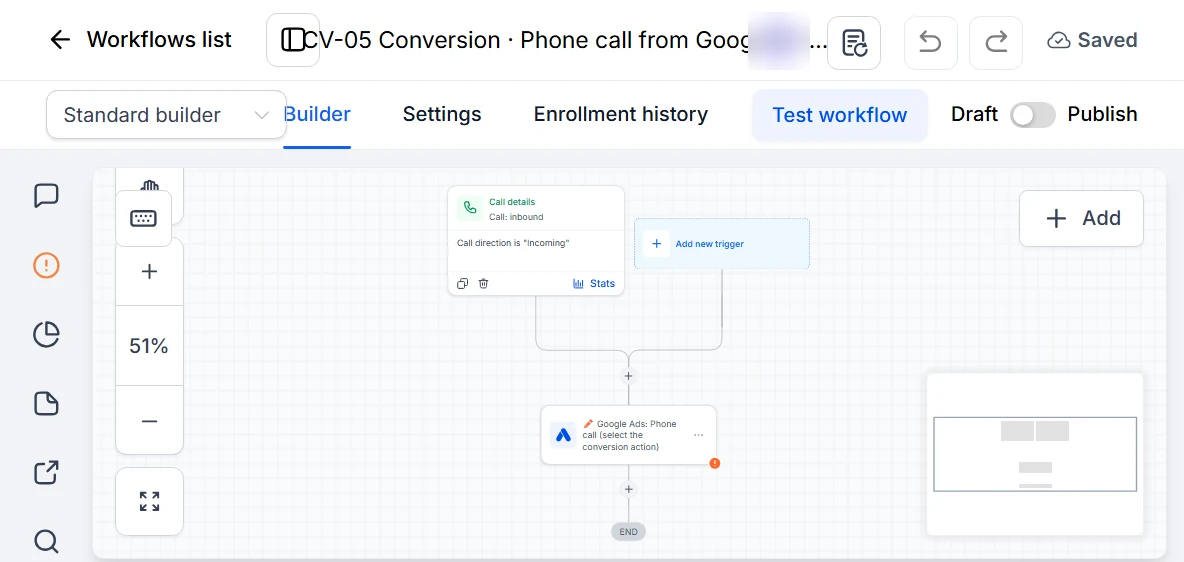
Then the workflow, as HighLevel's Add to Google Ads article describes it: a Call Status trigger filtered to Call Direction, Incoming and to the pool, followed by Add to Google Ads with the conversion, currency and value. In this account I created the pool and changed the landing page to show its number. My notes from that job stop there, so I have no call numbers from this account to report. I build the same call workflow in my demo accounts, shown in the trap below.
Leak 6: a Tag Manager warning marked Urgent
Why it happens. The container's quality panel said "Urgent". The issue behind it: Tag Manager had detected the landing page's domain as an additional domain that wasn't configured.
The fix. I applied the suggested cross-domain setting to the Conversion Linker tag and published a new container version. If the link between the click and the visit breaks across domains, the conversion has nothing to attach to.
Leak 7: a conversion action marked "Needs attention"
Why it happens. The status alone doesn't say. Google showed it with a Troubleshoot button next to it, on an action that had recorded 0 conversions.
The fix. Open Troubleshoot before changing anything. That action lived on the ad account's side, so I passed it to the team running the ads with that instruction instead of guessing at the cause.
The trap I check for in every account: one call counted twice
Google's counting options page explains the setting. "Every" counts every conversion after an ad interaction. "One" counts one conversion per ad click, and Google recommends One for leads. Google's import guidelines only treat an upload as a duplicate when the click ID, the conversion name, the date and the time all match. So two workflows that send the same call a few seconds apart can both count when the action is set to Every.
HighLevel's setup guide doesn't settle it: its steps recommend Every, and its FAQ recommends One for lead generation. For leads I follow Google and pick One. The exception: HighLevel says GBRAID and WBRAID only work with "Many Per Click", so an action that depends on those IDs can't use One. Then I keep exactly one workflow per conversion action. When the pool workflow goes in, any Google Ads step in other call workflows (a missed call text back workflow, a call follow-up) comes out.
My demo accounts carry this as a Conversions folder: five workflows for new lead, booked, showed, purchase with value and phone call from Google Ads. They ship as drafts, because each one needs the buyer's own Google Ads connection and conversion action, and the call workflow needs the buyer's pool as a filter.
How do you test it before you trust it?
HighLevel's article is blunt: there is currently no way to test this event directly. Its call tracking guide adds that typing a gclid into the address bar no longer imitates a Google Ads click. So test in layers:
- The plumbing. I ran a test contact with a made-up click ID. The step went from Skipped to Error, which is what a fake ID should produce, and it proved the trigger and mapping were running.
- A real click. Click your own ad, submit the form with test details and check that the contact shows the Google Click ID field filled.
- The log. The Add to Google Ads step should say Executed for that contact.
- Google's side. HighLevel says processing can take from a few hours to 24 to 48 hours. Google's GCLID guide also says to wait 4 to 6 hours after creating a new conversion action before uploading to it.
- Calls. Land from a real ad, call the swapped number from your phone and check the call report, the contact and the workflow log.
One limit to plan around: Google's guidelines say offline conversions uploaded more than 90 days after the click are not imported. A sale that closes four months after the click will not count, so report an earlier stage too, like booked or showed.
Should you set this up yourself?
If you run your own ads and have one landing page built in GoHighLevel, the steps above are enough. Get help when the form is embedded from another app, when there is more than one domain or when calls are where your patients come from. If you'd rather start from a pre-built dental system and install it yourself, the dental pack is $22.
For the wider build, see my dental CRM letter and the dental GHL expert checklist. Testing habits are in how I test GoHighLevel workflows, and pool numbers follow the same texting rules as any number, covered in connecting Twilio to GoHighLevel.
What should you ask whoever builds yours?
- Which workflow sends each conversion, and what is its trigger? Show me the trigger.
- Where is the click ID stored on the contact? Show me one real lead with it filled.
- Is custom mapping on, and which fields map to GCLID, GBRAID and WBRAID?
- Is each conversion action set to One or Every, and why?
- Does any other workflow also send calls to Google Ads?
- What happens to a lead that becomes a patient more than 90 days after the click?
- What did the execution log say for the last real lead: Executed or Skipped?
Want me to set up your tracking?
I set up Google Ads conversion tracking inside GoHighLevel accounts: the click ID fields, one Add to Google Ads workflow per conversion, the number pool for calls and the test that proves each one runs. Pick a time on the calendar below this post. We'll open your current setup together first, and I'll tell you which of these seven leaks you have before I change anything.
About the author

Carlos Familia, CRM & AI automation expert. GoHighLevel, n8n, AI agents, servers. Full-stack developer.
I build CRM systems in GoHighLevel, n8n automations on my own servers and AI voice and chat agents for service businesses. Full-stack developer: I write the workflow, the API integration, the database and the server it runs on, and I test every build with real journeys before handoff.
Book a call with Carlos
In 30 minutes we look at how you get customers today and what to automate first. Pick a time · contact@bluemiraisystems.com