How I Test GoHighLevel Workflows (After Six Mistakes)
How I test a GoHighLevel workflow with do-not-disturb contacts, one journey per path, skipped waits and step-by-step logs, based on six mistakes from my builds.
By Carlos Familia, CRM & AI automation expert. Updated . 7 min.
I built eight niche demo accounts for my own GoHighLevel automation packs. Most of them got 69 workflows and 30 fake do-not-disturb contacts. Version 1 passed 104 of 104 test journeys, about 3,300 executed steps. Version 2 passed 268 journeys across the eight accounts.
Getting there showed me how many ways a passing test can lie. Here are six mistakes from those runs, and what I do now.
To test a GoHighLevel workflow, use a fake contact with do-not-disturb on and no real phone, run one journey per path and per exit, skip the waits instead of sitting through them, and read each step's status and reason in the log. HighLevel's own help article for the Custom Webhook action suggests running Test Workflow in draft mode with a sample record. That covers one path. The six mistakes below are what a single run misses.
I call each fake contact's walk from trigger to exit a journey. A journey passes only when the contact reaches the expected final step and every step in between shows the right status.
Mistake 1: Trusting the newest log row
GoHighLevel keeps writing "condition: success" rows while a contact waits. The newest row looks healthy, but the contact is still parked on a wait step, so the newest row is not the contact's state.
The fix is to read each step's status and its reason, then confirm which step the contact is actually on. A final "success" proves little until you know where the contact is.
Mistake 2: Building and testing in the same session at once
Builds and test journeys running in the same logged-in session kill each other. Parallel test runs also died from "Failed to fetch" blips, which are brief connection errors.
The fix was retries and one request per round. The rule I follow now is simple: build or test, not both at once. If you pay someone to do both, ask how they keep the two apart, and how they handle a test run that dies halfway.
Mistake 3: Trusting a publish
Four things went wrong after publishing.
- A failed publish left a draft with the same name as the live workflow.
- Publishing re-armed the workflow's triggers, even when I had saved them as inactive.
- Tag-triggered workflows started late under load, so a slow start looked like a failure.
- Rebuilding a workflow with deleted steps ended every enrollment paused on those steps within seconds.
After every publish, search the workflow list by name, count the copies and check the trigger state. Wait before judging a tag-triggered start. After every edit, retest with a fresh contact, because a workflow with re-entry off never lets a contact that already ran through it back in.
Mistake 4: Forcing loops to prove them
Force-resuming a loop more than about four times hit GoHighLevel's "Loop Locked" state. Skipping waits is fine for a linear path. A loop has to be proven with real one-minute waits.
The mortgage demo shows why you count loops up front. It had 60 workflows published, and 60 of 60 ran. Of those, 57 finished. The other three were intentional loops, so the right result was 57 finished and 3 still running by design.
If you had not counted the loops first, 57 of 60 would look like three failures. Write down which workflows are meant to keep going before the first test runs.
Mistake 5: Using Gmail to prove an "opened" branch
Gmail fetches the open pixel on delivery, so an untouched email counts as opened. A branch that says "if opened" fires without a human looking at anything.
I no longer treat an open as proof that anyone read the email. If a branch matters, use a click or a reply when you can. If you must test an open-based branch, know that a Gmail test address will fool you.
Mistake 6: Testing in conditions that do not match the live account
A test contact or a test setup that is missing real-world context fails in ways the live account does not. Four examples from my builds:
- No owner. An Add Task step assigned to the contact owner is skipped on a contact with no owner.
- No opportunity. A contact enrolled by hand or by API has no opportunity context, so stage conditions read false until the workflow looks the opportunity up.
- Empty wallet. With no balance in the agency wallet, a premium step such as a custom webhook is skipped, and only that step's own detail says why.
- Wrong payment mode. Payment mode is set per funnel, and my cloned funnels came up in live mode. I ran 108 of 108 checkout logic checks and 72 of 72 mobile checks before trusting them.
One more trap sits in do-not-disturb itself. When a text fails with a carrier error such as 30005 or 30006, GoHighLevel turns SMS do-not-disturb on for that contact. A bot that reads do-not-disturb as STOP then opts the lead out for good. Check what your logic believes a do-not-disturb flag means.
Give the test contact an owner and an opportunity in the right pipeline. Fund the wallet. Check the payment mode on every cloned funnel.
What did all that testing add up to?
Here is the record from the demo builds, so you can judge how much testing a system of this size takes.
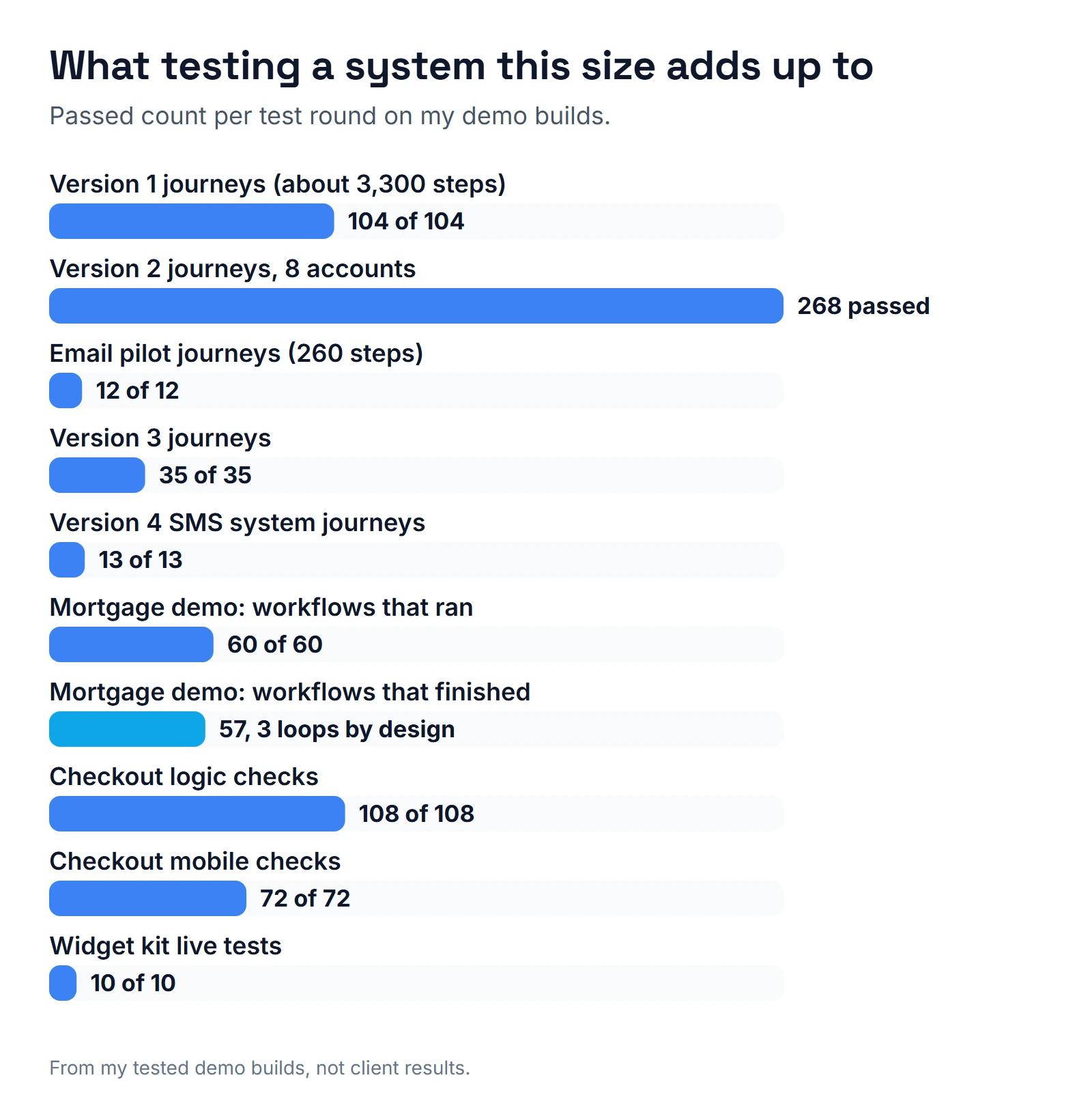
| Test round | Result |
|---|---|
| Version 1, automation journeys | 104 of 104 passed, about 3,300 executed steps |
| Version 2, automation journeys | 268 passed across 8 accounts |
| Email pilot | 12 of 12 journeys, 260 steps |
| Final rounds | Version 3 passed 35 of 35 and the version 4 SMS system 13 of 13, in all 8 accounts |
| Mortgage demo | 60 workflows published, 60 of 60 ran, 57 finished (3 intentional loops) |
| Checkout | 108 of 108 logic checks, 72 of 72 mobile checks |
| Widget kit | 10 of 10 live tests |
A single Test Workflow run could never produce numbers like these. The count is the point. A system with 69 workflows has many paths, and a person clicking through them by hand will skip some.
Why is my GoHighLevel workflow not working?
If a live workflow did nothing, check these in order before you change anything.
- Did the trigger fire? A tag trigger fires only when the tag is newly added. Re-adding a tag the contact already has does nothing, so remove it first.
- Has the contact been through it before? With re-entry off, a returning contact never re-enters.
- Was a step skipped? Open the step detail. An empty wallet or a missing owner skips a step without a banner.
- Is there an opportunity? Stage conditions read false when the contact has no opportunity context.
- Did a text fail? A carrier error such as 30005 or 30006 turns SMS do-not-disturb on for that contact. Check the flag before you blame the workflow.
- Is this the right copy? A failed publish can leave a draft with the same name as the live workflow.
What do I do now?
This is the routine I follow on every build.
- Create fake contacts with do-not-disturb on, no real phone or email, an owner, and an opportunity in the right pipeline.
- List every path and exit first. One workflow with three branches needs at least three journeys, plus the exits.
- Skip waits on straight paths. Prove loops with real one-minute waits.
- Read each step's status and reason. Confirm where the contact sits.
- After a publish, count copies, check the trigger state and wait before judging.
- After any edit, run the journeys again from fresh contacts.
- Keep the logs. A log is the proof you hand to the client.
Text steps add one more dependency. A text only arrives once registration is approved, so read my notes on GoHighLevel A2P registration before you judge a texting test. If your workflow calls n8n, test that step as well. The webhook details are in GoHighLevel n8n.
If you came here because a workflow is not working, start with my list of GoHighLevel workflow mistakes. If you are choosing someone to build for you, ask whether they work this way. My checklist for hiring a GoHighLevel expert turns these habits into questions. You can also see the result in the niche demo builds behind packs like the HVAC pack.
About the author

Carlos Familia, CRM & AI automation expert. GoHighLevel, n8n, AI agents, servers. Full-stack developer.
I build CRM systems in GoHighLevel, n8n automations on my own servers and AI voice and chat agents for service businesses. Full-stack developer: I write the workflow, the API integration, the database and the server it runs on, and I test every build with real journeys before handoff.
Book a call with Carlos
In 30 minutes we look at how you get customers today and what to automate first. Pick a time · contact@bluemiraisystems.com