Connect Twilio to GoHighLevel: LC Phone or Your Own Account?
How to connect Twilio to GoHighLevel and add a Twilio number to a sub-account, when LC Phone is the better pick, and the Twilio errors that quietly waste your texts.
By Carlos Familia, CRM & AI automation expert. Updated . 9 min.
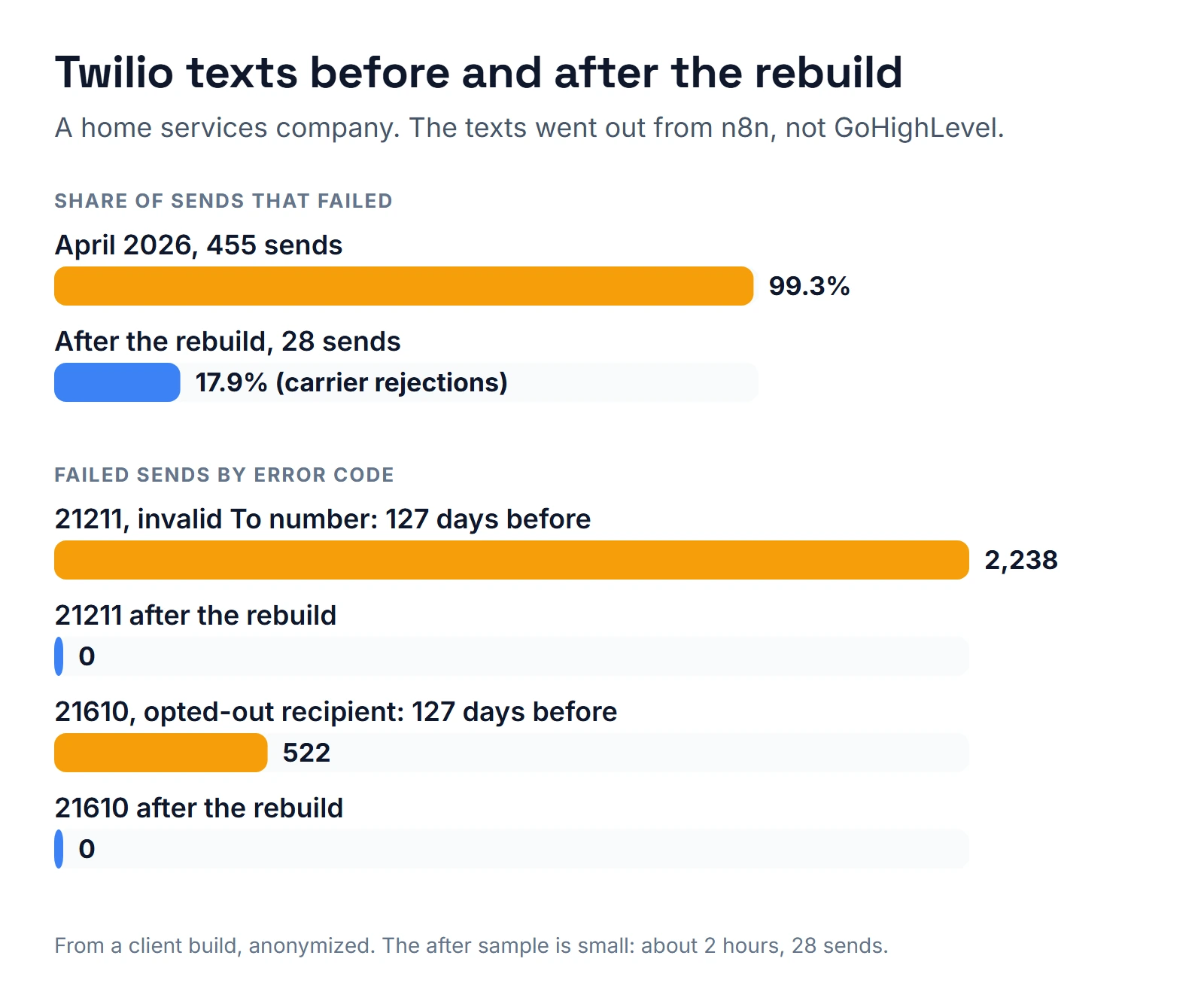
In April 2026, a home services company in Pennsylvania tried to send 455 texts through Twilio, and 99.3% of them failed. The texts came from an automation that pulled customers from Housecall Pro into Airtable and sent through n8n, not from GoHighLevel. Over the 127 days I audited, 2,238 sends had failed with Twilio error 21211, 1,780 of them addressed to a bare "+1". Another 522 went to people who had already replied STOP. I rebuilt it for the agency that runs the account. In a two-hour sample after go-live, 23 of 28 texts were delivered (82.1%), with no 21211 or 21610 errors. The next day the client asked us to switch the whole system off, and we did.
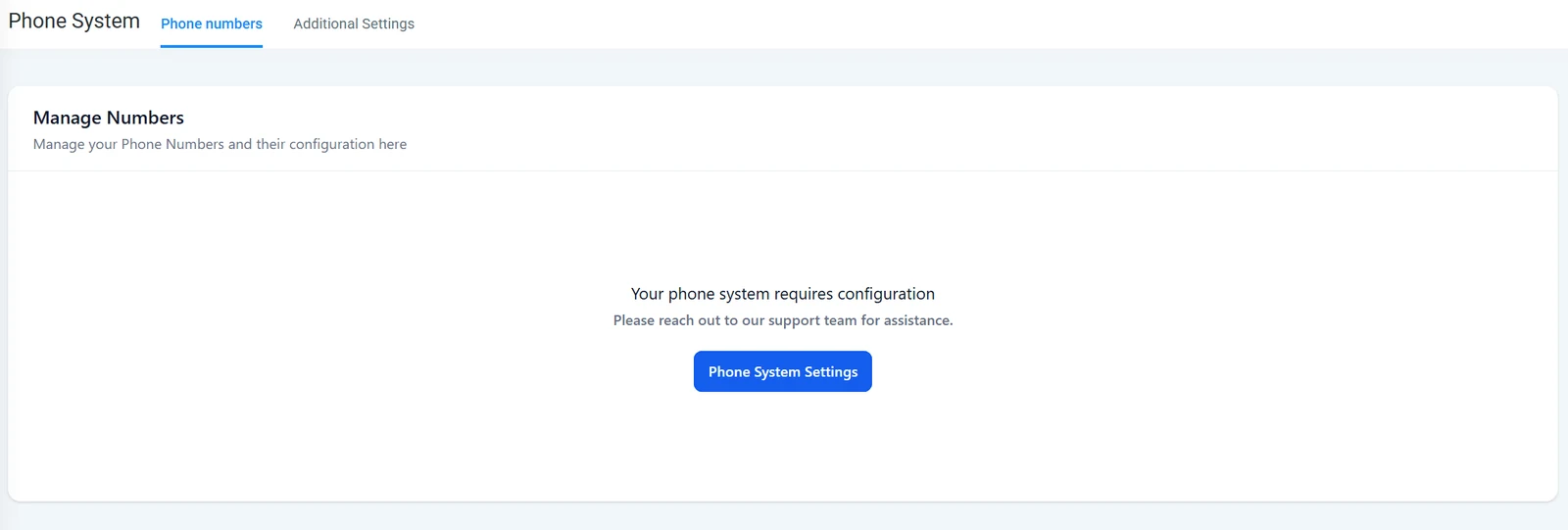
Should you connect Twilio to GoHighLevel? Most accounts shouldn't. LC Phone, GoHighLevel's built-in phone system, is the default and recommended option, and calls and texts work as soon as it is enabled, per HighLevel's LC Phone article (updated September 11, 2026). Connect your own Twilio when you already own numbers, history and registration there, or when your agency bills phone usage through its own Twilio account. Either way, the Twilio errors in that story are the ones GoHighLevel shows you too.
| Option | What it covers | Cost driver | Setup effort | What breaks |
|---|---|---|---|---|
| LC Phone (default) | Calls, texts, number pools and missed call text back inside GoHighLevel | Usage, with real-time billing in HighLevel | Minutes | Texting registration and sending limits still apply |
| Your own Twilio, agency managed | The same features, with numbers in your Twilio sub-accounts | Twilio usage, which agencies can rebill | A request per sub-account | Numbers lost if not released first; numbers bought in the wrong sub-account |
| Twilio outside GoHighLevel (n8n or code) | Texts from another system; replies don't land in GoHighLevel's inbox | Twilio usage plus your server | Days | Everything in the story above |
What did that rebuild teach me?
HighLevel's LC Phone error dictionary (updated September 8, 2026) lists 21211, 21610, 30007 and 30034 with the same meanings Twilio gives them. So the lessons from a system outside GoHighLevel carry straight into one inside it:
- Bad numbers loop. The scheduler retried the same empty number every 5 minutes, because nothing marked the record as failed. Nineteen sends went to "+1Phone Number": a spreadsheet's header row, imported as a customer.
- STOP has to stick. Before go-live I found 2,564 contacts who had opted out at some point and flagged every one of them.
- Repeated failures need a ceiling. Some numbers had 50 to 76 failed attempts each. The rebuild's send filter skips any number with 3 recorded failures.
- Someone has to watch. A monitor checks Twilio every 30 minutes and posts to the team only when a text failed.
The five undelivered texts after the rebuild were carrier rejections: two landline or unreachable numbers (30006) and three filtered messages (30007). I have no record of whether those 23 texts booked any jobs. If you run a field service business and wonder where texting should live next to your scheduling software, my home service CRM guide covers that split.
Step 1: Decide which account owns the numbers
Use LC Phone unless you have a reason not to. If you do switch a sub-account from LC Phone to your own Twilio, HighLevel's disable LC Phone article (updated March 20, 2025) says to release any numbers you want to keep first. Numbers you don't release are permanently lost. Then you submit a form with the Location ID, Twilio Account SID and Auth Token, one request per sub-account.
Going the other way, from your Twilio to LC Phone, HighLevel's migration article (updated October 9, 2026) says your texting registration does not move with you and US and Canadian numbers need no regulatory bundle. Its migration guide adds that recordings and voicemails don't move, so download them first.
Step 2: Map one Twilio sub-account to each location
In Agency View, open Settings, Phone Integration, Sub Account Settings. The location should show Twilio under Managed By, with its own Account SID. HighLevel's agency-managed Twilio article (updated September 18, 2026) says each location should map to its own Twilio sub-account, and not to reuse another client's to skip that step. Keep the Auth Token out of screenshots and shared notes.
Step 3: Add the Twilio number from the matching sub-account
This is the answer to "how do I add a Twilio number to GHL", per HighLevel's buying guide (updated September 1, 2026):
- Copy the location's Account SID from step 2.
- In the Twilio Console, switch to the sub-account with that SID.
- Open Phone Numbers, Manage, Buy a number, and pick a number with SMS and Voice.
- Buy it, then refresh Settings, Phone Numbers in the GoHighLevel location.
A number bought from the main Twilio account, or from an unrelated sub-account, may never appear. If it doesn't show, check the SID match before anything else. Tracking numbers for ads are a separate job, done with number pools; see GoHighLevel Google Ads conversion tracking.
Step 4: Register for A2P before the first text
Error 30034 means the sending number is not linked to an approved campaign. A mortgage brokerage I worked with had its brand registered as Sole Proprietor, which covers one number, so texts from the other reps' numbers failed with 30034. The full checklist is in my GoHighLevel A2P guide, and it applies whether the number is LC Phone or Twilio.
Step 5: Put every number in E.164 before anything sends
Twilio's 21211 page says the To number is not valid or not formatted correctly, and asks for E.164: a plus sign, the country code and the number, with no spaces. A bare "+1" is what you get when a blank phone field is glued to a country code. Check imports for empty phones and header rows, and send a few bad numbers through a test list on purpose to see what your system does with them.
Step 6: Treat STOP and error 21610 as an opt-out everywhere
Twilio's 21610 page (updated March 11, 2026) says the person opted out of your number, usually by replying STOP, or the number was reassigned. Remove them, or ask them to text START. HighLevel's dictionary ties 21610 to the contact's Do Not Disturb status as well.
The reverse mistake is just as real. On a med spa build in Pennsylvania, texts that failed with 30005 or 30006 switched SMS Do Not Disturb on, and a bot read that flag as a STOP. A failed text is not an opt-out. Check why Do Not Disturb is on before you drop a lead for good.
Step 7: Watch failures every 30 minutes
Inside GoHighLevel you don't need n8n for this, though the n8n GoHighLevel integration guide shows how when the texts start elsewhere. HighLevel's Messaging Error trigger (updated May 27, 2025) starts a workflow when a text ends undelivered, and you can filter it by error code. Use it to create a task, tag the contact or stop a sequence. Use the same ceiling as the rebuild: after 3 failures, stop texting that number.
Step 8: Outside the US and Canada, plan for regulatory bundles
In many countries, Twilio needs a regulatory bundle, meaning your business identity and supporting documents, an address, or both, before some local numbers can be used. Twilio's bundle guide (updated May 6, 2026) says review generally takes up to three business days and can take weeks in some regions, and that changing a number's bundle starts the review again.
On a voice agent build in Ireland, two things surprised me. The address had to be inside the approved bundle, not just saved on the account. And I found no way to edit the bundle once it was approved, so for a new address I submitted a new bundle that reused the approved business identity. That one was approved in about a day.
Step 9: Test with a kill switch and a dry run
Before go-live, I backed up all 15 workflows, added a pause switch that every send checks first and a dry-run flag that logs "would send" without calling Twilio. Every real test text went to my own phone.
In GoHighLevel, the same idea looks like this. Use a test contact with your own number, one with Do Not Disturb on, one with a bad number and one that replies STOP. Then read the conversation's error and the workflow's execution log for each. My missed call text back checklist has a scoring table for the texting side.
FAQ
How do I add a Twilio number to GHL?
Find the location's Account SID under Agency View, Settings, Phone Integration, Sub Account Settings. Buy the number inside the Twilio sub-account with that SID, then refresh Settings, Phone Numbers in the location. If the location runs on LC Phone, buy the number from GoHighLevel instead.
Why does GoHighLevel say "No Twilio account found"?
The location has no phone system at all, neither LC Phone nor Twilio. I hit it on a mortgage loan officer's sub-account: no texts could go out and the web phone was unavailable. Enable LC Phone or connect a Twilio sub-account. If the person lives in another phone system, read my RingCentral GoHighLevel integration notes.
Will my A2P registration move if I switch to LC Phone?
No. HighLevel's migration article says registration from your own Twilio account does not migrate to LC Phone, so the sub-account has to register again.
Is LC Phone cheaper than Twilio?
HighLevel's LC Phone article says it usually is, through internal billing efficiencies. That is HighLevel's claim, so compare current rates for your volume before you move.
Should I connect Twilio myself or get help?
Buying a number in the right sub-account and linking it is an afternoon for a careful admin. Get help when you are moving numbers between providers, when texts go out from a system outside GoHighLevel, or when a sequence already sends to thousands of contacts. For that last case, my SMS marketing automation specialist post shows what an audit turns up.
Want me to connect it for you?
I connect phone systems to GoHighLevel sub-accounts for owners and agencies, whether that means LC Phone or your own Twilio. That covers the numbers in the right sub-account, the texting registration and an alert when texts start failing. If your texts already go out from another system, I can audit that too. Grab a time on the calendar below and we'll decide which account should own your numbers.
About the author

Carlos Familia, CRM & AI automation expert. GoHighLevel, n8n, AI agents, servers. Full-stack developer.
I build CRM systems in GoHighLevel, n8n automations on my own servers and AI voice and chat agents for service businesses. Full-stack developer: I write the workflow, the API integration, the database and the server it runs on, and I test every build with real journeys before handoff.
Book a call with Carlos
In 30 minutes we look at how you get customers today and what to automate first. Pick a time · contact@bluemiraisystems.com