GoHighLevel A2P 10DLC: Mistakes I Made and What I Check Now
GoHighLevel A2P 10DLC registration checklist from my own mistakes: brand type, EIN match, opt-in, rejection codes, wait times and what to build while pending.
By Carlos Familia, CRM & AI automation expert. Updated . 7 min.
On a roofing build in Kentucky, I designed the appointment confirmation around texts. The homeowner replies YES to confirm or NO to cancel, and NO cancels the appointment. It is a clean flow, and it had one problem: the account had no approved texting registration yet, so no text could reach a homeowner.
The account was email-only, and the email balance was empty. That build gave me a rule I treat as non-negotiable: never ship a "no reply cancels the appointment" step before registration is approved. The text never arrives, so every booking would cancel.
So what do I check before I submit a GoHighLevel A2P 10DLC registration? Six things, in this order:
- The business category is eligible.
- The legal name and EIN match the IRS letter.
- The brand type fits the business and its numbers.
- The website and privacy pages are live.
- Every opt-in method is described.
- The build assumes weeks of waiting.
Most of them trace back to one of the mistakes below.
The one approval I can describe first-hand is my own business's. Blue Mirai's campaign was approved in October 2026, after I built privacy and terms pages and made the chat widget the opt-in.
The rules I quote come from HighLevel's campaign registration guide, two more HighLevel help pages and Twilio's Standard brand registration guide, which I read on October 14, 2026.
Mistake 1: I built a flow that needs texts to arrive
The roofing story above is the first one. The cost, had it shipped, is simple: a rule that cancels on silence cancels everything when the silence is caused by a missing registration.
The fix is to design for the channel you actually have. While registration is pending, the confirmation runs on email and the chat bot, and any step that depends on a text arriving waits. The same logic holds for a missed call text back, which has to wait for approval too.
Mistake 2: I counted on email without checking the balance
On that roofing account, email was blocked because the email balance was empty. Premium actions skip silently when the agency wallet is empty, and the reason shows up only in the step's log details. I have no results to report for that build: the bot was in test mode and email was blocked.
If email is your only working channel, fund the balance and read a real run's logs before you call anything done.
Mistake 3: I didn't check what a Sole Proprietor brand allows
A mortgage brokerage in Florida had a brand registered as Sole Proprietor. I found out what that means when texts from the other reps' numbers failed with error 30034, and I had to pin 12 workflows to the one approved sender.
HighLevel's brand registration guide is clear about it: Sole Proprietor accounts are limited to one phone number per campaign, and a Standard Brand can support multiple numbers. It also lists registering a business that has a Tax ID as Sole Proprietor as a common rejection cause. If your business has an EIN, HighLevel says you must register as a Standard Brand.
Mistake 4: I let an HVAC build lead with texts before approval
For an HVAC company in California, the registration came back rejected with codes 30909 and 30891. HighLevel's rejection guide files 30909 under opt-in and consent: reviewers could not verify the call to action or message flow, so every way people consent has to be described. It files 30891 under website: the URL submitted was invalid, and the site has to be working (or the description has to say it is pre-launch).
The cost was a texting channel I couldn't rely on. The fix was to send email first and let the SMS steps wait. Those are the codes' general meanings; my records don't say what triggered them on this account or whether it was approved later, so I won't guess.
Here is how HighLevel handles a rejection. The campaign shows a "View required fixes" link next to each reason, with the error code, the category, what it means and the correction. Fix every listed reason, review the whole campaign, then resubmit. While a campaign is pending, don't resubmit and don't create another one.
Mistake 5: I built a voice agent that texts a link from an unregistered number
In a collision shop demo, the voice agent's tow-link text failed because the number wasn't registered. The pre-approved number pool sends fixed templates only, so a custom link can't go through it.
Twilio's registration guide explains the purpose: registration gives carriers information about your business and messages "so carriers don't filter them". Fix the sending number first, then build the tool that uses it.
Mistake 6: I let a failed text turn into an opt-out
On a med spa AI-calling build in Pennsylvania, a failed text with error 30005 or 30006 made GoHighLevel switch SMS do-not-disturb on. The bot read that flag as a STOP and treated the lead as opted out for good.
A failed send is not a STOP. Make your bot check why the flag is on before it excludes a lead.
What do I check now?
- Is the category even eligible? For a credit repair client, my research put the category on the prohibited list for SMS, so I routed that client to WhatsApp and email. HighLevel's rejection guide says some groups, including disallowed content, are not eligible for resubmission.
- Do the legal name and EIN match the IRS letter? Use the exact name and tax ID from your CP 575 (or 147C) letter, not the name on W-2 or W-9 forms, and not a DUNS number. HighLevel says CP 575 upload is optional but recommended, that an EIN issued in the last 15 days may be rejected, and that addresses can't be P.O. boxes. After three failed tries, HighLevel asks for the CP 575 or a 147c letter.
- Does the brand type fit the business? Sole Proprietor is only for a business with no Tax ID and one employee, and it covers one number. With a Tax ID you register Standard, and HighLevel's campaign guide offers Low Volume Standard (up to 6,000 SMS segments a day) or High Volume Standard (up to 600,000), both with multiple numbers.
- Is the website live and honest? It should be public, match the brand details, show the business name and contact details, and link a public privacy policy and terms.
- Is every opt-in method described? HighLevel's default path is the chat widget, and the widget should be the only form on the submitted page that collects SMS consent. The manual path asks for the opt-in method, form URL, flow description and opt-in message with the program name, message frequency, rates disclosure, HELP and STOP. For a restaurant build, I listed verbal consent as well, with the chat widget as the only web opt-in.
- Does the business email domain match the website? In that restaurant build I flagged a mismatch during prep because carriers reject it. HighLevel adds that a business-domain email is recommended for a Standard Brand, while a Sole Proprietor brand must use a public one such as Gmail.
- Do the sample messages identify the sender and include opt-out language? HighLevel's campaign guide says they should.
- Who will receive the verification? A Sole Proprietor brand needs a US or Canadian mobile number that can receive a one-time code. VoIP and LeadConnector numbers aren't accepted. An email code gives you 3 attempts and 2 resends, and an identity check may be required, so have the authorized person at the keyboard.
How long should I plan for?
Plan for weeks. HighLevel's campaign guide gives no review time.
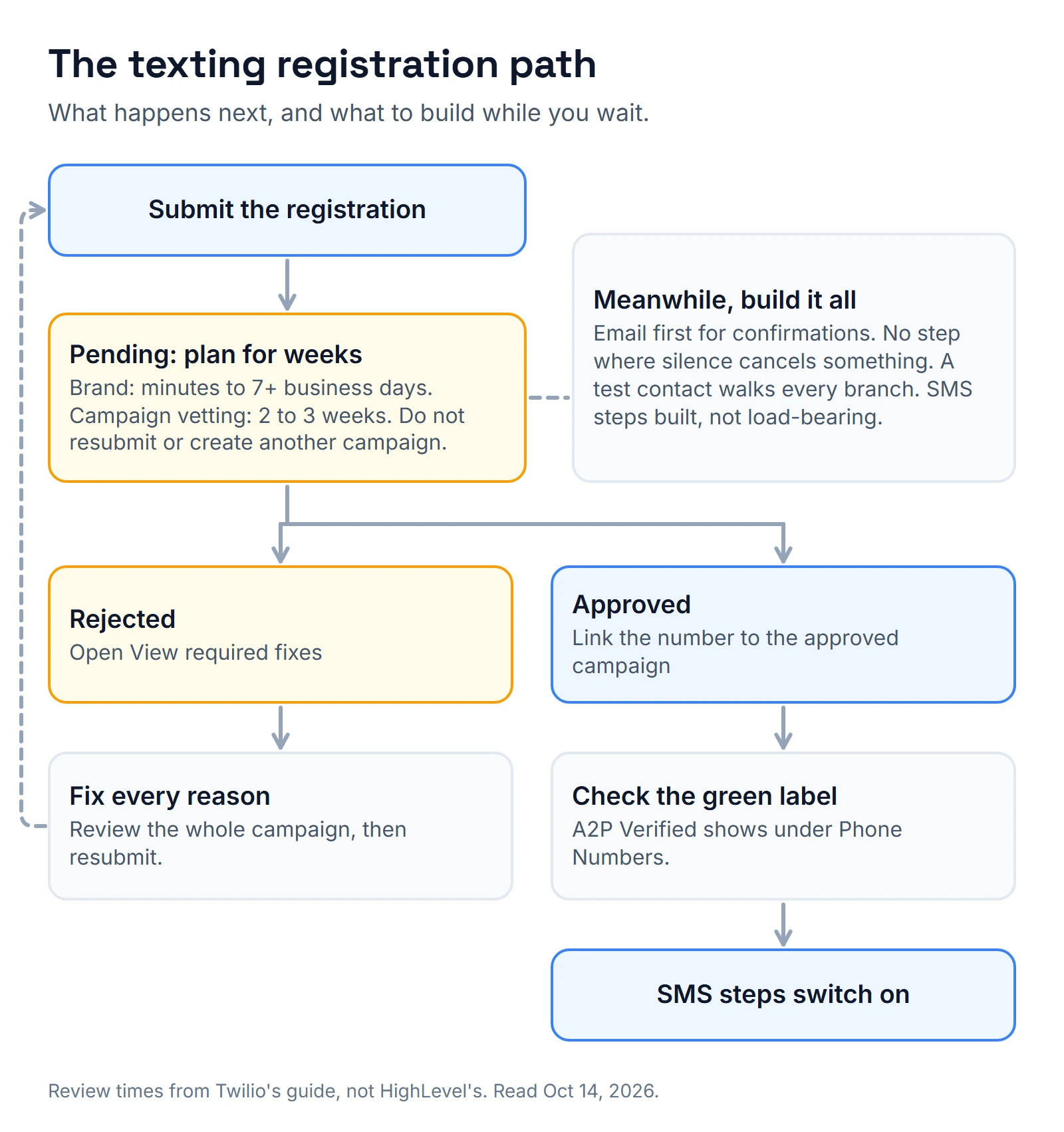
Twilio describes its own flow rather than HighLevel's, so treat its numbers as a guide, not a promise. Its guide says a brand is usually reviewed by The Campaign Registry within minutes, with manual review taking seven business days or more. It says manual campaign vetting can take two to three weeks, and when I read it, a warning said reviews were taking 10 to 15 days.
After approval, check that the sending number shows the green A2P Verified label under Phone Numbers. If it doesn't, link the number to the approved campaign.
Fees are a separate question. HighLevel says registration, vetting, monthly campaign and carrier messaging fees are passed through without a HighLevel markup, and it points to its own fees article for the amounts. Check that article in your account before you quote a client a number.
What do I build while it's pending?
I build everything, test it, and keep texting out of the critical path:
- Email first for confirmations and reminders.
- No step where silence cancels something.
- A test contact that walks every branch, with the logs read.
- SMS steps built but not load-bearing, so approval turns them on without a redesign.
For more on testing, read how I test GoHighLevel workflows. The same rules shaped my HVAC AI receptionist case study, and the other niche guides cover the details: HVAC CRM, roofing CRM and auto repair CRM. If you want someone to review a registration before you submit it, see the GoHighLevel expert hiring checklist or book a call.
About the author

Carlos Familia, CRM & AI automation expert. GoHighLevel, n8n, AI agents, servers. Full-stack developer.
I build CRM systems in GoHighLevel, n8n automations on my own servers and AI voice and chat agents for service businesses. Full-stack developer: I write the workflow, the API integration, the database and the server it runs on, and I test every build with real journeys before handoff.
Book a call with Carlos
In 30 minutes we look at how you get customers today and what to automate first. Pick a time · contact@bluemiraisystems.com