GoHighLevel Zapier Integration: 8 Quiet Failures and Their Fixes
GoHighLevel Zapier integration from real Zaps: what the LeadConnector app can and cannot do, when to skip Zapier, and fixes for eight failures that raise no error.
By Carlos Familia, CRM & AI automation expert. Updated . 9 min.
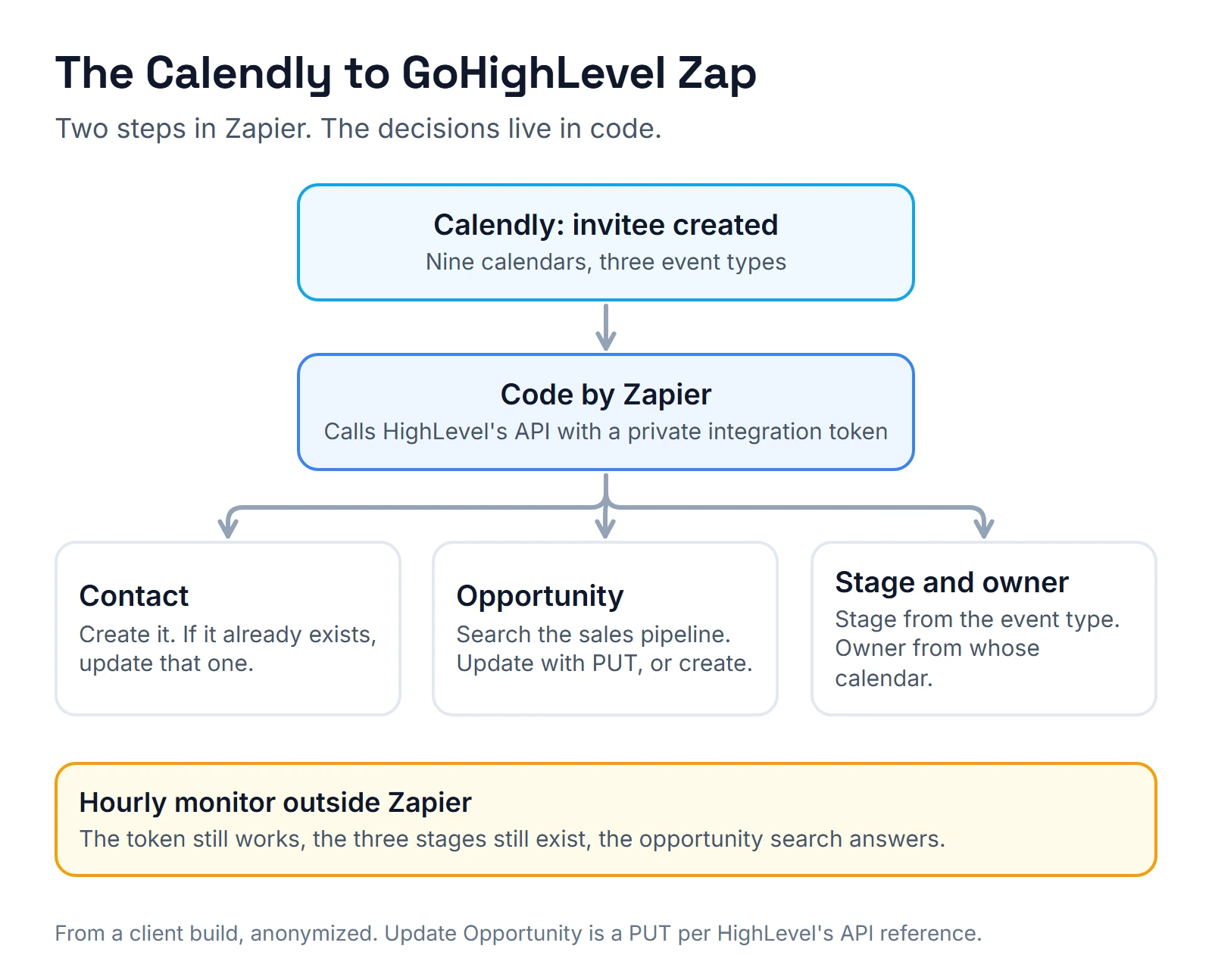
A digital agency books sales calls on nine Calendly calendars and wanted each booking in GoHighLevel as a contact plus an opportunity, in the right stage, owned by the rep whose calendar was booked. A Zap for it already existed, built by someone else. Its business name field was mapped to Calendly's question instead of the answer, so the value it carried was "What is your business name?" Nothing in Zapier flags that, because the step did exactly what it was told.
How do you connect GoHighLevel to Zapier? Use Zapier's LeadConnector app. You sign in with your HighLevel login and pick the sub-account, with no API key. It gives you one trigger, Pipeline Stage Changed, and five actions, with no search actions, per Zapier's LeadConnector guide (updated October 1, 2026). For any other event, send a GoHighLevel workflow's Webhook step to a Zapier Catch Hook. For lookups the app can't do, add a Code by Zapier step that calls HighLevel's API with a private integration token.
Zapier fits short, one-way jobs the owner can read. Skip it when records need IDs in both directions, when volume is high or when an AI agent is involved. (If you are weighing Make instead, see Make.com expert or n8n developer.) And because most Zap failures make no noise, every fix below adds a check.
Which ways can Zapier and GoHighLevel connect?
| Path | What it can sync | Cost driver | Setup effort | What breaks quietly |
|---|---|---|---|---|
| LeadConnector app on Zapier | Stage changes out; contacts, opportunities, tasks and workflow enrollment in | Zapier tasks | Low | No search, so updates can miss and duplicates appear |
| Workflow Webhook step to a Zapier Catch Hook | Any workflow event out | Tasks, on a paid Zapier plan | Low | Filtered runs |
| Zapier to GoHighLevel's Inbound Webhook trigger | Any JSON that starts a workflow | HighLevel premium, $0.01 per execution | Low | Keys with spaces, no email or phone |
| Code by Zapier with a private integration token | Searches, updates, anything the API allows | Tasks; code runtime of 1 second on Free, 30 on Professional | Medium | Token rotation, wrong method |
| n8n instead of Zapier | Two-way sync with IDs, retries and AI | Executions or your own server | Medium to high | You build the alerts yourself |
HighLevel's Zapier webhook article (updated December 15, 2023) says catching webhooks in Zapier needs a paid Zapier plan. The code runtimes come from Zapier's Code by Zapier page (updated July 13, 2026), and the premium rate from HighLevel's premium features article (updated September 28, 2026). For the billing math across tools, see n8n vs Make vs Zapier.
Symptom 1: "The Zap says successful, but the fields hold the wrong text"
Cause. Calendly sends each booking question as a pair: the question and the answer. Two fields in the agency's Zap, business name and "Booked by", pointed at the questions.
Fix. Clear the mapping and pick the answer fields. Then test with a real booking and open the contact in GoHighLevel. A step that copies the wrong text still succeeds, so the contact is the only place this shows.
Symptom 2: "Updating the opportunity fails with a 404"
Cause. The code step updated opportunities with PATCH. HighLevel's API reference documents Update Opportunity as a PUT.
Fix. Switch to PUT. With that working, the code sets the stage from the Calendly event type (discovery, strategy or onboarding) and the owner from whose calendar was booked. I published that as version 15 of the Zap.
Symptom 3: "Every booking creates another contact"
Cause. The LeadConnector app has no search action, so a Zap can't look up who already exists before it writes.
Fix. Move the lookup into code. Mine creates the contact, and if GoHighLevel answers that the contact already exists, it updates that one instead. Then it searches the contact's opportunity in the sales pipeline, updates it if found and creates it if not. Today I would start from HighLevel's Upsert Contact endpoint, which follows the location's Allow Duplicate Contact setting.
Symptom 4: "The Zap stopped working after someone touched the token"
Cause. The code step used a private integration token that was due to expire, and GoHighLevel never shows a token again after you create it.
Fix. Rotate it with "Rotate and expire this token later". HighLevel's private integrations docs say both tokens keep working for 7 days, which is your window to paste the new one into the Zap. Then I added an hourly monitor outside Zapier. It checks that the token still works, that the three pipeline stages the routing needs still exist and that the opportunity search answers.
Symptom 5: "Records disappear and Zapier shows no error"
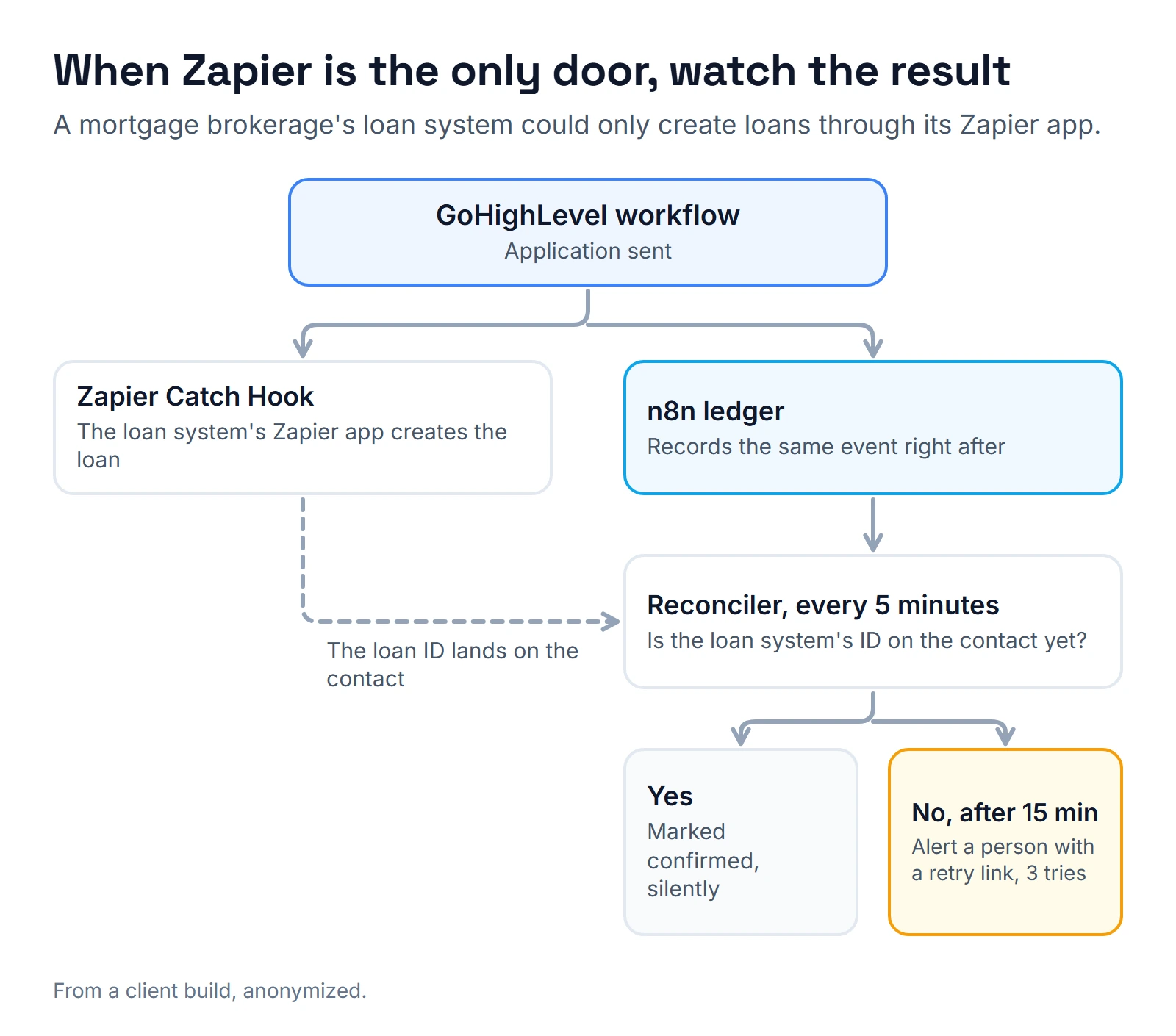
Cause. A Filter step. Zapier's run statuses page (updated May 29, 2026) says Filtered means the filter's conditions were not met, so later steps did not run. That is not an error, and nobody is told. At a mortgage brokerage in Florida, a filter that passed only a fixed list of five staff emails dropped 9 records in 7 days.
Fix. Watch the result, not the Zap. In that account, creating a loan in the brokerage's loan origination system (LOS) could only happen through the LOS's Zapier app, so the Zap had to stay. The same GoHighLevel workflow that calls the Zap's Catch Hook now also posts the event to an n8n webhook that records it. Every 5 minutes, a check looks for the LOS ID on the contact. After 15 minutes without it, a person gets an alert with a retry link, good for 3 tries.
The full story of that bridge is in Zapier to n8n migration, and the rest of that brokerage's system is in mortgage CRM.
Symptom 6: "The ID in GoHighLevel points at the wrong record"
Cause. In the same inventory, one Zap wrote the LOS's lead ID into the field meant for its loan ID. Another matched records coming back by email and phone only, because no GoHighLevel ID traveled with the data.
Fix. Put the GoHighLevel contact ID in every payload you send to a Catch Hook. When the other system's ID comes back, store it in a field named for exactly that kind of ID.
Symptom 7: "A Zap is on, but nothing has run for weeks"
Cause. Nobody watches what a Zap stopped doing. In that inventory, a form Zap was switched on with 0 runs in 30 days. Another, which sent funded loans to a home valuation tool, was switched off and had last worked in October 2025.
Fix. Keep a monthly list of Zaps: last run, owner and what breaks if it stops. Also know that Zapier pauses a Zap on its own when 95% or more of its runs in the last 7 days error, according to its advanced settings page (updated May 29, 2026). An off Zap may have been switched off by Zapier.
Symptom 8: "Errors arrive hours late, or never"
Cause. Autoreplay. Zapier's replay page (updated May 29, 2026) says it retries a failed step up to 5 times, with the last try about 10 hours and 35 minutes after the first error, and sends no error email until the final try fails. Filter and Paths steps are never replayed.
Fix. For anything time sensitive, alert on the outcome, as in symptom 5, instead of waiting for Zapier's email. Export what you need to keep, too: Zapier's Zap history page (updated June 15, 2026) only guarantees 60 days of run data.
How do you test a GoHighLevel Zap before you trust it?
- Use a test contact with your own email and phone, never a client's.
- Make one real booking per calendar type, here discovery, strategy and onboarding.
- Open the contact and the opportunity in GoHighLevel and check every mapped field, the stage and the owner. The Zap history is not proof.
- Book twice with the same email. You should get one contact and one opportunity.
- Send a record your filter should drop, and confirm a person hears about it.
- Rotate the token on a test copy and confirm your monitor fails loudly.
The same habits apply to the GoHighLevel workflows around the Zap, as in how I test GoHighLevel workflows.
When should you set it up yourself?
A form or booking that creates a contact with a tag is an hour of work, and you should do it yourself. Get help when the Zap needs a code step, when IDs must flow both ways, when a filter decides something that matters or when the other system's only door is its Zapier app. Before you hire, my Zapier expert red flags are worth five minutes. If you are deciding whether the job belongs in n8n instead, the n8n GoHighLevel integration guide shows the alternatives.
Quick lookup
| Symptom | Likely cause | First fix |
|---|---|---|
| Successful run, wrong text in fields | Mapped the question, not the answer | Remap to answer fields, check the contact |
| 404 when updating an opportunity | PATCH instead of PUT | Use PUT |
| Duplicate contacts | No search in the LeadConnector app | Create then update, or Upsert Contact |
| Zap broke after a token change | Expired or replaced private token | Rotate with the 7-day overlap, add a monitor |
| Records gone, no error | A Filter step | Record each event and alert on missing results |
| ID points at the wrong record | Wrong ID type, no GoHighLevel ID sent | Send the contact ID, name fields by ID type |
| Zap on, no runs for weeks | Nobody watches it, or Zapier paused it | Monthly Zap list with last run and owner |
| Errors hours late | Autoreplay holds error emails | Alert on outcomes, export history |
Want me to fix or build your Zaps?
I build and repair GoHighLevel Zaps for business owners: the code step when the LeadConnector app falls short, the ID fields, and a monitor that tells a person when something stops. Book a time on the calendar below and bring the list of Zaps you run today. I'll mark which ones should stay in Zapier and which ones I'd move to n8n, then build whichever path you pick.
About the author

Carlos Familia, CRM & AI automation expert. GoHighLevel, n8n, AI agents, servers. Full-stack developer.
I build CRM systems in GoHighLevel, n8n automations on my own servers and AI voice and chat agents for service businesses. Full-stack developer: I write the workflow, the API integration, the database and the server it runs on, and I test every build with real journeys before handoff.
Book a call with Carlos
In 30 minutes we look at how you get customers today and what to automate first. Pick a time · contact@bluemiraisystems.com