Mortgage CRM on GoHighLevel: What I Built for a Brokerage
A mortgage CRM on GoHighLevel has to text fast, route loans by stage, count realtor referrals and sync with the LOS. Here is the full 8-step build I used.
By Carlos Familia, CRM & AI automation expert. Updated . 9 min.
A mortgage brokerage in Florida wanted the first text to every new lead to go out as an iMessage, with plain SMS as the backup. The texting provider was the account's only sender, so appointment reminders ate the daily message cap and the night greetings failed. I built an n8n router that chooses the provider for each message, and we set its cap at 200 because we believed the provider's limit was 210. The real limit was 10 a day. Failures also showed up 5 to 6 minutes after sending, so my first delivery check, at 30 seconds, never saw them.
What did that teach me about building a mortgage CRM?
A mortgage CRM is a chain of systems: lead sources, texting, calls, a loan origination system (LOS) and realtor reports. Every link has limits and delays nobody mentions in the sales call. So the CRM has to do four jobs: answer new leads fast, move each loan through its stages without anyone dragging cards, track the realtors who send you business, and notice when a link fails.
The eight steps below are the order I'd build it in. They come from that Florida brokerage's account, which I worked on in stages: an audit, texting and calling, the LOS bridge, referral tracking and monitoring.
Step 1: Map the stages before you build a workflow
I inherited this account from a previous agency: 281 workflows across 27 folders, of which 95 were live and 186 sat in draft as legacy.
The 95 that mattered shared a structure worth copying:
- One folder per pipeline stage, so you can see what fires when a loan moves.
- 27 stage triggers, each filtered by both pipeline and stage.
- A wait, then a fresh read of the opportunity, so nobody gets a message meant for the stage the loan just left.
- One dropdown field with 14 objection reasons driving the follow-up.
- Task steps (71 of them) instead of notifications, with only 2 direct user assignments.
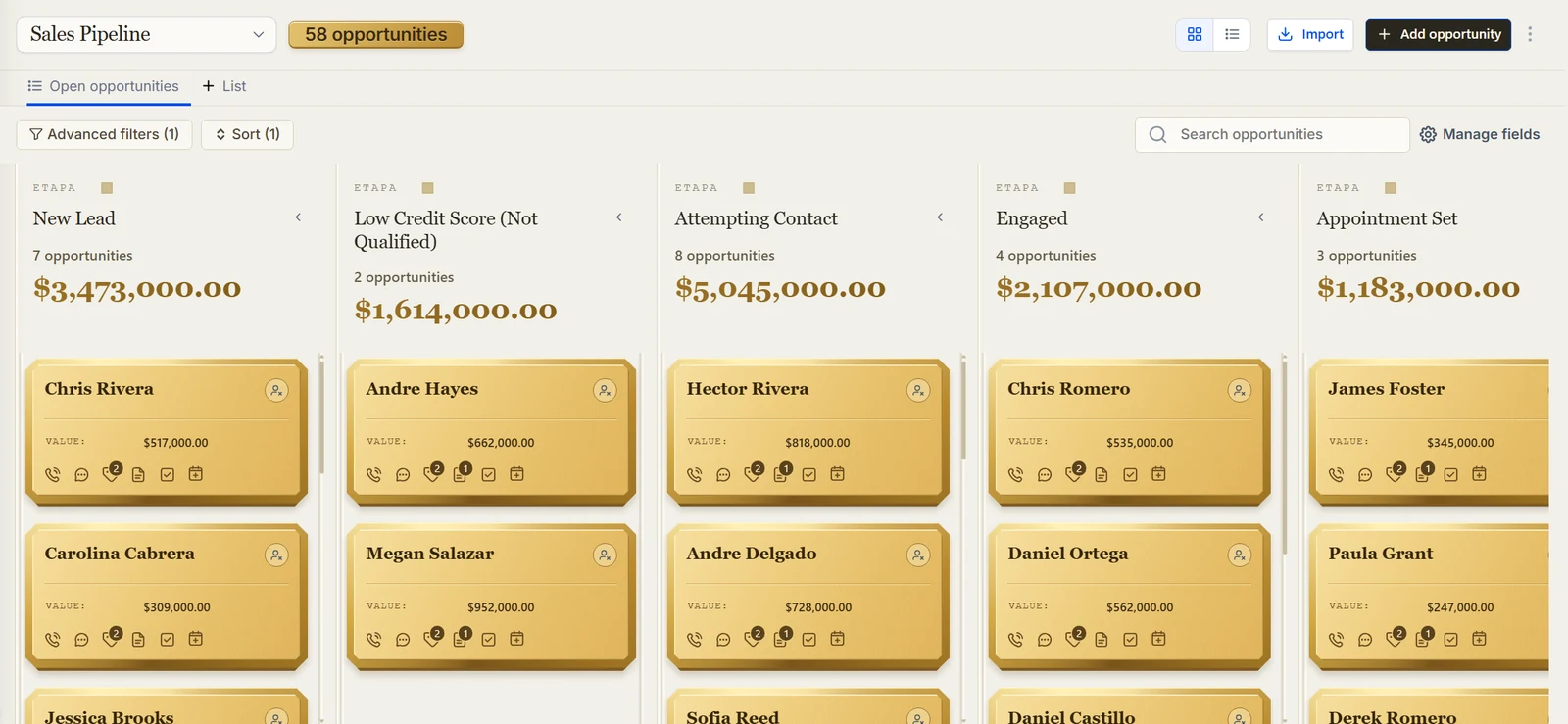
I wrote up the full audit in the mortgage CRM audit case study.
Step 2: Choose your texting setup and test its limits
After the cap mistake, the router got three safeguards. It re-checks delivery at 30 seconds and again at 8 minutes. If a message failed, it resends by SMS and posts a Slack alert. And setting the cap to 0 is the kill switch.
Two more traps in the same area:
- A2P registration. The brand had been registered as Sole Proprietor, which covers one number. Texts from the other reps' numbers failed with error 30034, so 12 workflows were pinned to the approved sender. I cover that in A2P 10DLC for GoHighLevel.
- A hidden flag. When I converted marketplace action steps into webhook steps, the converted steps kept a flag and GoHighLevel skipped them. For about 2 days, leads that came in during office hours got no welcome (5 leads). Read a real run's logs after you change a step type.
More bugs of this kind are in GoHighLevel workflow mistakes.
Step 3: Give loan officers a daily call list
Loan officers needed a list spaced by attempts. An n8n job runs at 7 am, scans open opportunities in the calling stages, reads the total call attempts and sets the next call date:
| Attempts | Next call |
|---|---|
| 1 to 3 | Daily |
| 4 to 8 | Every 2 days |
| 9 to 15 | Every 3 days |
| 16 to 24 | Every 5 days |
| 25 to 32 | Every 7 days |
| 33 | Stop |
It scanned 1,054 open opportunities. The first live run silently lost 28 contact reads and 16 tag writes to rate limits (HTTP 429), and nothing errored. After I added retries with backoff, a concurrency of 4 and failure counters, the job did 118 of 118 reads and 43 of 43 tags. Run time dropped from 152 seconds to 29.
Calling had a trap of its own. When the brokerage started placing calls from the iMessage line, the first calling rule locked 573 contacts who had already been called. Run any new rule against existing contacts in a test before it goes live.
Step 4: Track realtor referrals without double counting
Realtor reports were being matched by hand in Excel pivot tables. Now a spreadsheet goes in, a preview shows what the parser understood, and a commit step writes each referral once, keyed on the agent and the borrower together. The result feeds a referral pipeline with counters, the property address and a client list.
A 330-row sheet produced 106 agents, 325 referrals and 5 ignored duplicates. Uploading the same file again created 0 new records.
Three bugs showed up first:
- Only the workbook's first tab was being parsed.
- A yes/no column called "Has Real Estate Agent" created agents named "Yes" (33 of them) and "No" (48).
- Referrals had to be counted by loan, not by person.
Step 5: Sync the LOS and make the sync report its own misses
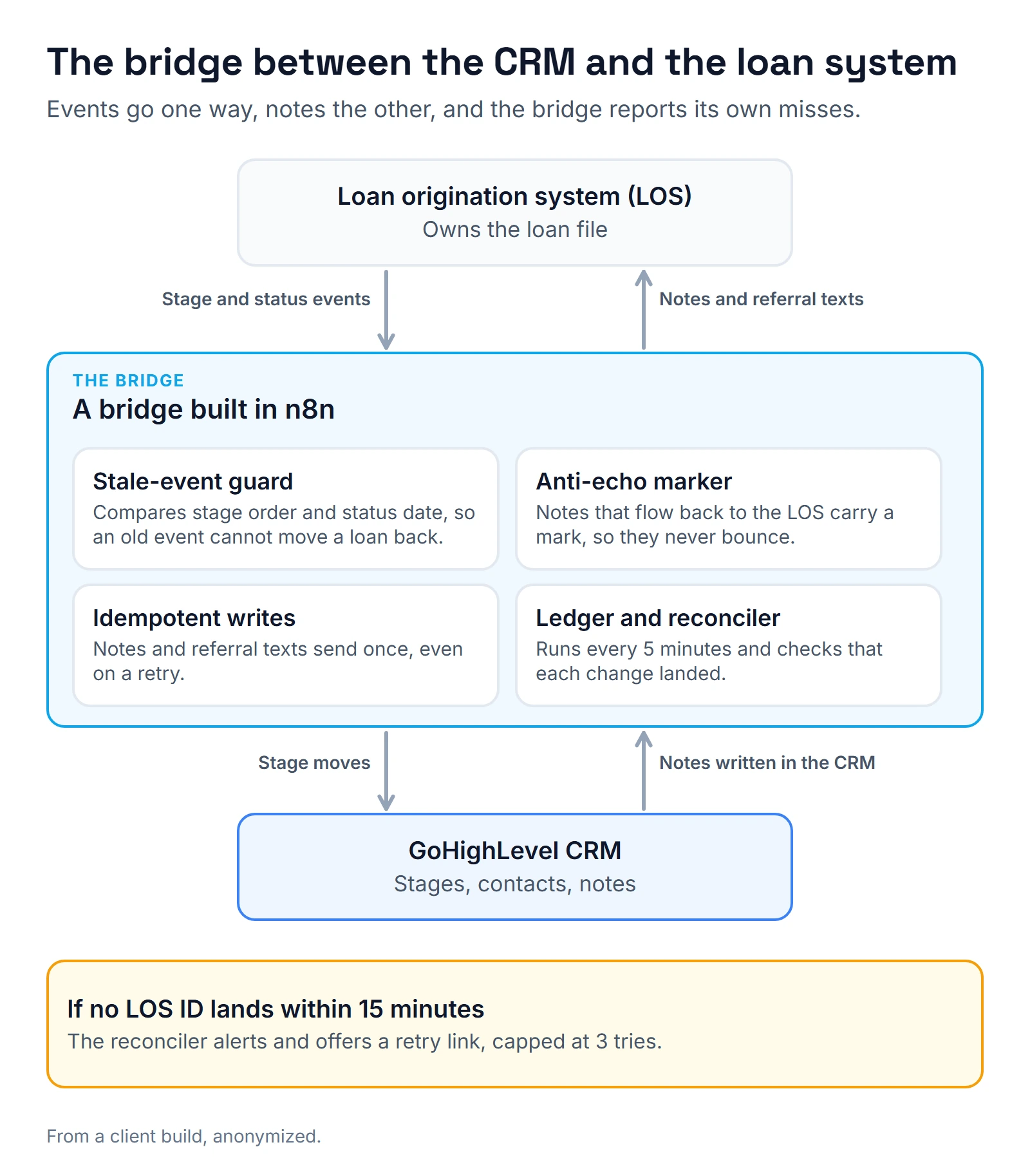
The bridge started life in the owner's personal Zapier account, with no IDs and silent filters. In 7 days those filters discarded 9 records, and Zapier counted every one as a success. Notes written in GoHighLevel never reached the LOS, because the notes webhook didn't belong to any Zap.
I moved the logic to n8n and added the checks that were missing:
- A stale-event guard that compares stage order and status date, so an old event can't move a loan backward.
- Idempotent notes and referral-agent texts, so a retry doesn't send twice.
- An intent ledger and a reconciler that runs every 5 minutes. If no LOS ID lands within 15 minutes, it alerts and offers a retry link, capped at 3.
- An anti-echo marker on notes that flow back to the LOS, so a note doesn't bounce between systems.
Be careful which field you trust. Just 226 of the 2,032 contacts had an LOS ID at all. Worse, a lead field that looked like a conversion flag was really a back-reference: 0 of 733 leads showed as converted, yet 707 carried a loan ID. A sync built on that field gives confident, wrong numbers.
A loan-details sync now runs every 30 minutes. Its first run wrote 808 fields on 402 contacts.
Step 6: Build the repeat-client case on purpose
GoHighLevel refused to create a second opportunity for the same contact in the same pipeline, even when the first one was won or abandoned. The setting that lifts that limit also switched itself off within about 2 hours, and a real repeat client hit the wall.
The fix had three parts:
- An hourly check watches the setting.
- When a repeat client appears, n8n asks in Slack whether to create a new opportunity or update the old one.
- The Slack link opens a confirmation page first, because Slack previews links and a bare action link can fire by itself.
A related bug: a workflow looked up the contact's opportunity without a pipeline filter, so it pulled realtor opportunities into the sales pipeline. I added the filter and a guard, then corrected the 225 contacts it had affected.
Step 7: Put an alarm on everything
Silent failures cost more than loud ones. Four I fixed on this account:
- No alert on failure. I put an error workflow on every active n8n workflow, with one alert per workflow, step and error, and repeats silenced for 30 minutes. An hourly watchdog catches workflows that were switched off or schedules that didn't run. An error workflow that isn't published never runs.
- A channel that said "accepted" for days. GoHighLevel's WhatsApp step logged success while GoHighLevel had lost access to the WhatsApp Business Account after the office line moved to another phone system. I replaced the alert with SMS, and the first real lead after that reached 4 staff phones.
- Wrong-language reminders. Mixed language tags sent Spanish reminders to English speakers. I moved 33 contacts to a single language tag.
- Hardcoded owners. 24 hardcoded assignees across 12 workflows became one rule: the contact owner.
The reporting side found a data gap too: 111 open opportunities were stuck in the Funded stage.
Step 8: Check the rules and the bill
Mortgage brokers are covered by the FTC Safeguards Rule. It asks for a designated qualified individual, a written risk assessment, encryption of customer information, multi-factor authentication for anyone who accesses it, and a report to the FTC within 30 days when unencrypted information on 500 or more consumers is taken. Firms with customer information on fewer than 5,000 consumers are exempt from some provisions.
I'm not a compliance lawyer, so your compliance person owns that rule. What I can do is show them where the data lives: the CRM, the n8n server, Slack alerts, dashboards, documentation pages. Each one is a copy.
On cost, the GoHighLevel pricing page lists Starter at $97 a month, Unlimited at $297 and Agency Pro at $497, with a 14-day free trial and no free plan. The same page says phone numbers, texts, emails sent and premium AI are billed by usage on top of that. Buyers who want the structure without a custom build can install the mortgage Automation Pack, a $22 GoHighLevel snapshot, into their own account. The mortgage page shows more of my work in this niche.
For a custom build, a CRM implementation consultant should map your stages and fields before building anything. A GoHighLevel expert should show you a test run, not a slide deck. If you want to talk through your LOS, pick a time on the calendar below.
FAQ
What should a mortgage broker look for in a CRM?
Look for five things: stage-based automation you can read, a sync with your LOS that reports its own failures, referral tracking that doesn't double count, language handling if you serve Spanish speakers, and alerts when something stops. Ask to see each one running on a test contact.
Does a mortgage CRM replace the LOS?
No. The LOS owns the loan file and the CRM owns the relationship before and after it. They should exchange status and key dates, and neither should be the only place a fact lives.
Can GoHighLevel connect to my LOS?
It did for the brokerage in this post, through n8n. How far it goes depends on what your LOS lets outside systems read and write. Ask your LOS vendor first, then ask your builder to show how the sync reports a missed update.
Is a CRM compliant out of the box?
No. The FTC rule applies to your business, not to a tool. The CRM has to be set up so access, encryption and incident handling can be shown to your compliance person.
Why do mortgage CRMs lose repeat clients?
In the brokerage I worked on, it was GoHighLevel's limit of one opportunity per contact in a pipeline, plus a setting that switched itself back off within about 2 hours. I suspect a sync that overwrites the old loan record is the other common cause, though I haven't seen that one myself. Build the repeat-client case on purpose and test it before launch.
About the author

Carlos Familia, CRM & AI automation expert. GoHighLevel, n8n, AI agents, servers. Full-stack developer.
I build CRM systems in GoHighLevel, n8n automations on my own servers and AI voice and chat agents for service businesses. Full-stack developer: I write the workflow, the API integration, the database and the server it runs on, and I test every build with real journeys before handoff.
Book a call with Carlos
In 30 minutes we look at how you get customers today and what to automate first. Pick a time · contact@bluemiraisystems.com