GoHighLevel Workflow Mistakes: 21 Symptoms, Causes and Fixes
GoHighLevel workflow not working? 21 symptoms with the cause and fix for each, from tag triggers and opportunities to cloning, taken from real accounts.
By Carlos Familia, CRM & AI automation expert. Updated . 9 min.
When I opened a mortgage brokerage's inherited GoHighLevel account, it held 281 workflows and only 95 were active. To archive the previous agency's 190 workflows I compared everything: 1,559 actions and 257 triggers, with 0 differences. That job, and the other accounts I've built or repaired, left me with a list of the ways a workflow can look right and still behave wrongly.
In the accounts I've worked on, most workflow bugs came from five places: how triggers fire, how opportunities get matched, what a step silently skips, how messages repeat, and what a clone carries over from its source. Find your symptom below. Each has the cause and the fix I use, and a lookup table at the end lists all 21.
My workflow didn't fire when I added the tag
Cause. A "tag added" trigger fires only when the tag is newly added. If the contact already has the tag, adding it again does nothing. I hit this on a roofing build in Kentucky and on a med spa's AI caller in Pennsylvania.
Fix. Remove the tag first, then add it. Or make a separate event tag for the trigger and keep your status tag apart from it. A tag that starts a workflow is an event, not a state.
The same customer never gets the sequence a second time
Cause. Re-entry is off, so a returning customer never gets the confirmation again. On a roofing build in Kentucky, returning leads never got sequences. On an HVAC build in California, my own workflow compiler defaulted to no re-entry.
Fix. Turn on re-entry for any workflow that should repeat, and test it by running the same contact through twice.
Leads got the same message twice
Cause. The stage moved first and the guard tag arrived a second later, so the next stage's workflow ran without its guard. That's how a wellness clinic's WhatsApp funnel sent leads duplicate and triplicate follow-ups.
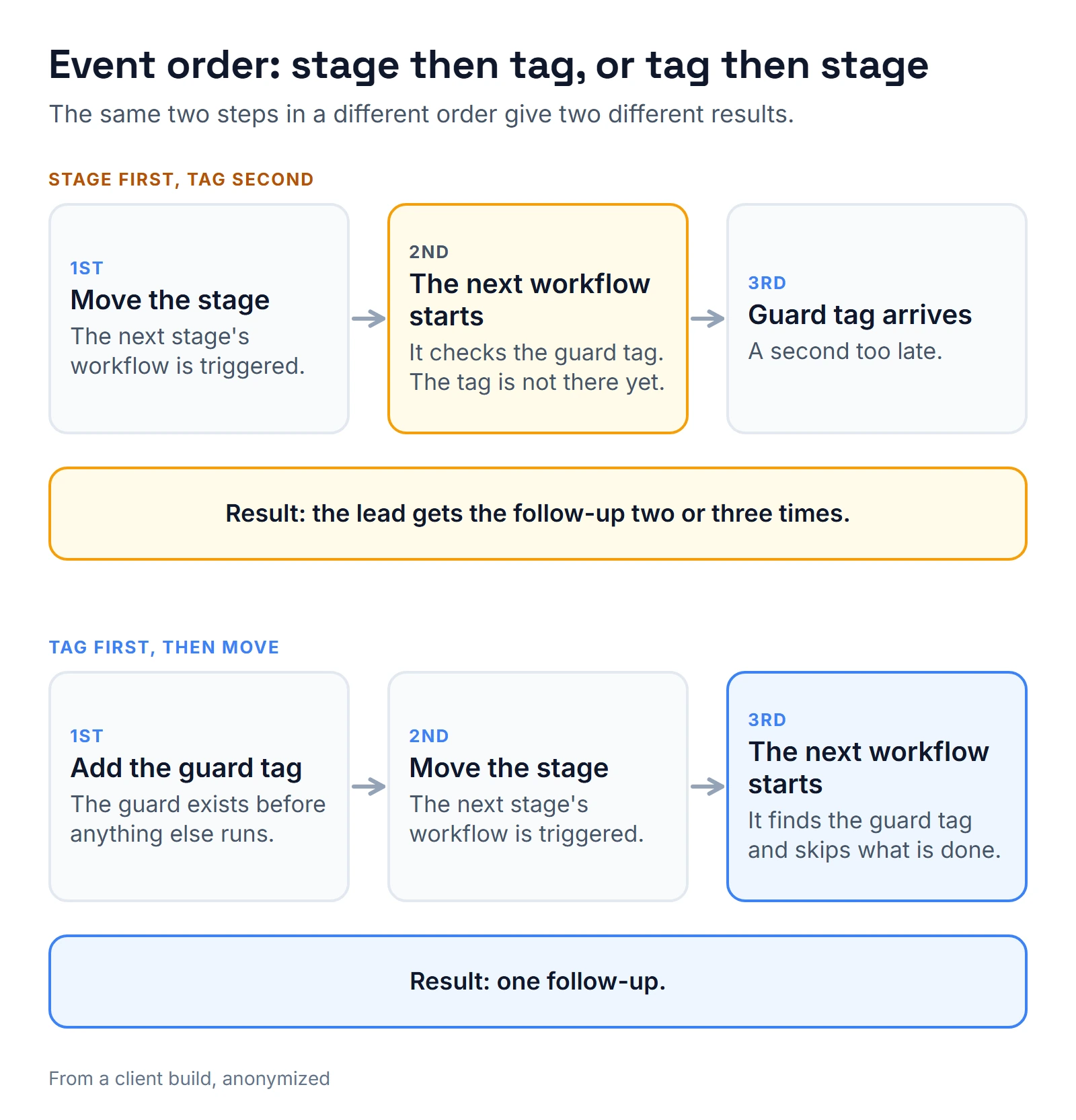
Fix. Tag first, then move. Before each outbound message, check both the stage and a sent tag. More on that build in n8n WhatsApp integration.
My stage condition is always false in testing
Cause. A contact you enroll by hand or through a test has no opportunity context. A condition that reads the stage evaluates false unless a find-opportunity step has run first. I hit this on a wellness clinic's funnel.
Fix. Put a find-opportunity step before any stage condition.
A workflow moved the wrong opportunity
Cause. A find-opportunity step with no pipeline filter returns the newest opportunity from any pipeline. The next update then drags it into the wrong place. On a mortgage account in Florida, a workflow triggered by calls dragged realtor deals into the sales pipeline, and 225 contacts had to be corrected afterward.
Fix. Always filter by pipeline, and add a guard that checks the pipeline before updating.
A returning customer can't get a second deal
Cause. A pipeline holds one opportunity per contact. Once a contact has one there, won or abandoned, GoHighLevel refuses a second. The setting that lifts the limit switched itself off within about 2 hours on that mortgage account, and a real repeat client hit it.
Fix. Turn the setting on, check it every hour with a small job, and decide in advance whether a repeat client gets a new opportunity or an update.
A premium step skipped and the log doesn't say why
Cause. Premium actions, like custom webhooks, skip silently when the agency wallet is empty. The step shows as skipped, and the reason is buried in the step's response details.
Fix. Keep the wallet funded and watch its balance. When a step skips, open the execution detail and read the response message before you guess.
A converted step does nothing
Cause. On the mortgage texting build, I swapped marketplace action steps for webhook steps. The new steps kept a hidden flag from the old ones, and GoHighLevel skipped them, so 5 leads who arrived during office hours went about 2 days without a welcome message.
Fix. After you change a step type, run a real contact through and read the log. Don't trust that the canvas looks right.
My webhook doesn't have the field I sent
Cause. The workflow Webhook step sends the whole contact, and your own custom data arrives nested under customData inside the body. I met this on that same mortgage build.
Fix. Read from the nested customData and log the full payload once while building.
No task was created
Cause. An Add Task step assigned to the contact owner is skipped when the contact has no owner. I saw it on a refinance watcher for a mortgage brokerage.
Fix. Make sure an owner exists before the task step, or add a fallback assignee.
My "none of these tags" check always passes
Cause. An if/else segment that joins three "does not have tag" checks with OR passes for any contact missing at least one of the tags, which in practice is nearly everyone.
Fix. "None of these tags" needs AND. I fixed this exact bug on a roofing build in Kentucky.
Contacts vanished from my workflow after I edited it
Cause. Two things. Deleting steps that contacts are waiting on ends their enrollments within seconds. And publishing re-arms the triggers even if you saved them as inactive.
Fix. Check who is currently waiting before you delete a step. After every publish, confirm the trigger state on purpose.
My clone points at the old account's workflows
Cause. Cloned steps that add or remove contacts from other workflows keep the source account's workflow IDs and fail silently. A credit repair build showed me this.
Fix. After cloning, scan for IDs that don't exist in the new account, then reselect the targets.
I opened a migrated trigger and the evidence disappeared
Cause. Opening a migrated trigger in the editor and saving it erases orphan IDs, so you lose the proof of what was broken.
Fix. Scan before anyone touches the migrated workflows. On a franchise migration for a portable storage company in Alabama, the scan found 3 real issues among 79 workflows, all already broken in the source.
My emails changed on their own
Cause. Editing a saved email template changes what already-published workflows send. The workflow didn't change, but the template under it did.
Fix. Duplicate the template to make a new version, and check which workflows use the old one first.
Open rates look too good
Cause. Gmail fetches the open tracking pixel on delivery, so an untouched email counts as opened.
Fix. Judge emails by clicks and replies. Treat opens as a loose signal.
My loop test stopped working
Cause. Force-resuming a loop more than about 4 times hits GoHighLevel's "Loop Locked" state. I met it while testing workflows with my compiler.
Fix. Prove loops with real 1-minute waits.
My bounce handler turned email back on
Cause. Bounce and complaint workflows that used a DND step set to change one specific channel turned email DND off, the opposite of the intent.
Fix. After you build any DND step, test it on a dummy contact and read the DND panel afterward.
Review requests only go to happy customers
Cause. A rating filter on the request step means only 4-star and 5-star customers are asked. That's review gating. On the mortgage account the pattern was right: requests go to everyone, and only the thank-you message filters by rating.
Fix. Filter by rating only when thanking, never when asking.
My internal notification didn't reach the person I picked
Cause. Internal email and SMS notifications accept only the contact owner as the recipient. If you want the office manager or a second rep alerted, the notification can't do it.
Fix. Make the person you want the contact owner at that moment, or alert them with a task or another channel. I ran into this on a roofing build in Kentucky.
Booked clients keep getting nurture emails
Cause. The nurture sequence has no exit for booking. On that roofing build, nurture kept emailing booked clients, and the reschedule path had no exit. Stop-on-reply caused a second problem: it ended sequences with nobody told.
Fix. Give every sequence exits on the events that make it pointless: a rebooked appointment, a reply or a stage change. My 3-month no-show recovery for an HVAC company in California runs weekly for 12 weeks, with exits on rebook, reply and stage change. When stop-on-reply ends a sequence, tell a human.
How do I catch these before a client does?
Test every path with an isolated contact that has do-not-disturb on and no real phone, then read the execution log for each journey. On my niche demo accounts that came to 268 journeys in the second round, and 104 of 104 in the first. The full method is in how I test GoHighLevel workflows.
What's the quick lookup table?
| Symptom | Likely cause | First check |
|---|---|---|
| Tag trigger didn't fire | Tag already on the contact | Remove, then add |
| Sequence skipped a returning customer | Re-entry off | Workflow settings |
| Duplicate messages | Stage move before guard tag | Step order |
| Stage condition false in a test | No opportunity context | Add find-opportunity first |
| Wrong opportunity changed | No pipeline filter | Filter on the step |
| No second deal for a client | One opportunity per pipeline | Setting plus hourly check |
| Step skipped, no reason | Empty wallet | Execution detail message |
| Converted step silent | Hidden flag | Read a real run's log |
| Custom data missing | Nested under customData | Log the payload |
| No task created | Contact has no owner | Assign owner first |
| Tag segment always true | OR instead of AND | Segment logic |
| Contacts ended mid-wait | Steps deleted under them | Who is waiting |
| Clone adds to the wrong workflow | Source IDs kept | Scan before editing |
| Evidence erased | Migrated trigger saved | Scan first |
| Emails changed | Shared template edited | Duplicate the template |
| Opens too high | Pixel fetched on delivery | Use clicks and replies |
| Loop test locked | Too many force-resumes | Real 1-minute waits |
| Email DND turned off | DND step misconfigured | Read DND panel |
| Only happy customers asked | Rating filter on the request | Filter only the thank-you |
| Alert didn't reach my pick | Only the contact owner is allowed | Set the owner or use a task |
| Booked clients still get nurture | No exit on booking | Add exits on rebook, reply, stage |
If this reads like a list of things you'd rather not debug alone, ask any GoHighLevel expert you're considering to run one of your workflows on a test contact before they touch the account. The mortgage CRM audit shows the same account end to end, and mortgage CRM shows what it became. The calendar below is open if you'd like a second opinion.
About the author

Carlos Familia, CRM & AI automation expert. GoHighLevel, n8n, AI agents, servers. Full-stack developer.
I build CRM systems in GoHighLevel, n8n automations on my own servers and AI voice and chat agents for service businesses. Full-stack developer: I write the workflow, the API integration, the database and the server it runs on, and I test every build with real journeys before handoff.
Book a call with Carlos
In 30 minutes we look at how you get customers today and what to automate first. Pick a time · contact@bluemiraisystems.com