n8n WhatsApp Integration: 6 Mistakes I Had to Fix in Production
Connect WhatsApp to n8n with the official Cloud API, know what Meta charges, and avoid the 6 mistakes that sent duplicate, false or missing WhatsApp messages.
By Carlos Familia, CRM & AI automation expert. Updated . 7 min.
A wellness clinic that serves Spanish-speaking patients had a WhatsApp funnel in GoHighLevel where leads got the same follow-up two or three times. Each workflow moved the contact to a new stage and then added a guard tag one second later. The stage change started the next workflow before the tag existed, so the guard checked a tag that wasn't there yet. I had to clean 31 contacts out of the four workflows. I made or inherited most of the mistakes below, and I've had to fix every one of them in production.
How do you connect WhatsApp to n8n? Use the official WhatsApp Business Cloud credentials: the WhatsApp Trigger node receives messages and status events, and the WhatsApp node sends messages and templates. Meta bills per delivered message, and since October 1, 2026 that includes your replies once a number uses up its free monthly allowance. An unofficial connector like Evolution API is not Meta's API, and WhatsApp's terms list bulk messaging as impermissible, so I treat it as a ban risk. The details are in the last section. Here are the mistakes first.
Mistake 1: Moving the stage before setting the guard tag
What it cost. Leads received the same message two or three times, and 31 contacts had to be cleaned out of the four workflows.
How I found it. The step order gave it away, as in the story above. A second problem sat next to it: each manual workflow carried the whole rest of the funnel, not just its own stage.
The fix. Tag first, then move. I also added short waits, cross-removal between the four workflows, stop on reply, a stage-plus-sent-tag check before every WhatsApp message, and an exit workflow. A new "last message at 10 days" step uses a Meta template I created for it. About 57 older contacts were deliberately left without the new message. More race conditions like this are in GoHighLevel workflow mistakes.
Mistake 2: Letting two things answer the same message
What it cost. On a med spa's chat bot (Facebook, Instagram and SMS), leads got double replies.
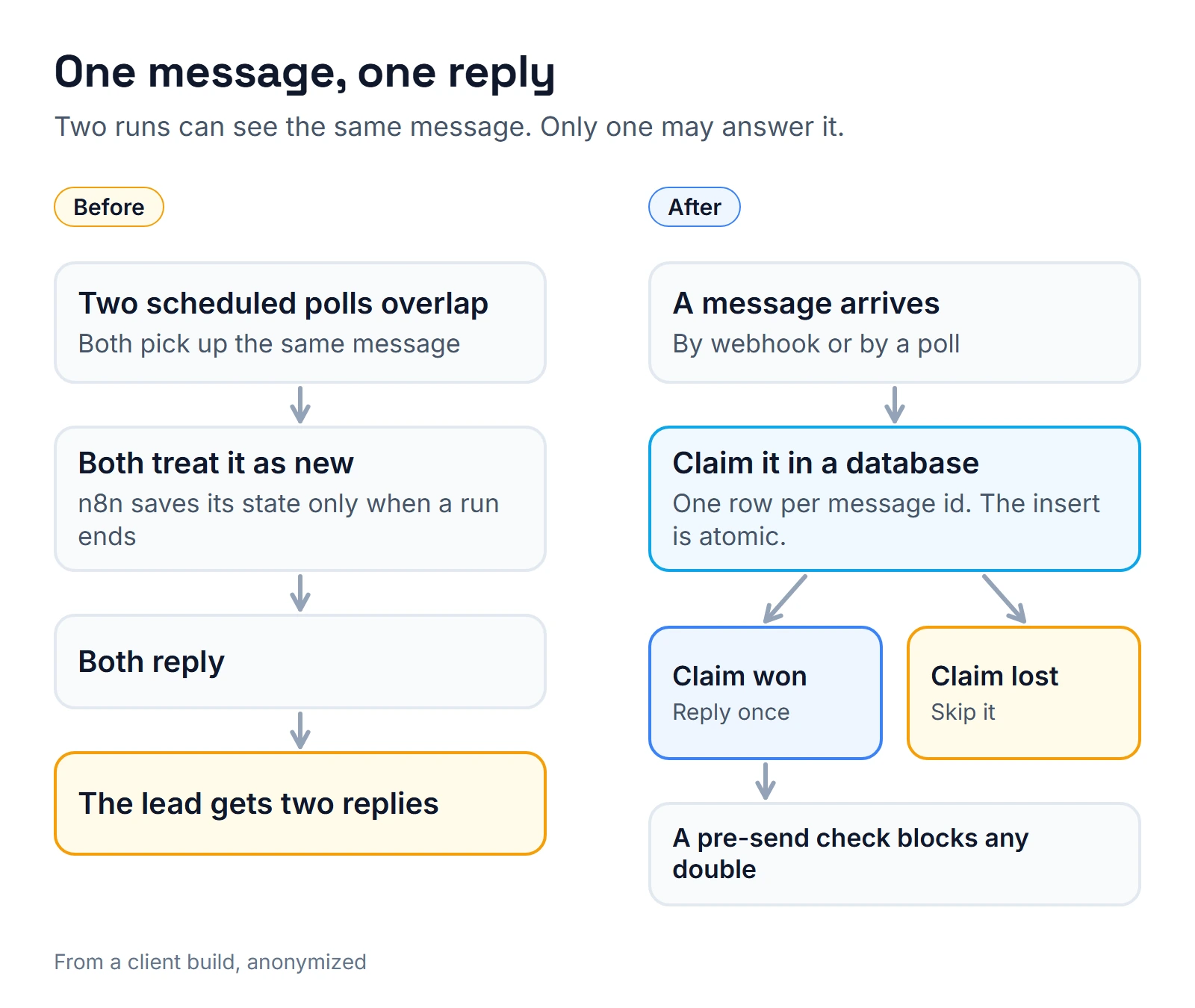
How I found it. Both replies traced back to overlapping scheduled polls that had picked up the same message. n8n only commits its static data at the end of a run, so neither poll knew the other had it.
The fix. Claim each message atomically in a database table before replying, and add a pre-send check against double messages. Later, a webhook replaced the 30-second polling.
I hit the cousin of this bug on an English-academy bot: GoHighLevel fired a marketplace webhook and a workflow webhook for the same message, so the same message arrived twice. Pick one entry point per message and turn the other off.
Mistake 3: Letting the bot say "booked" before it booked
What it cost. Leads at an insurance agency in Puerto Rico (more in my insurance agent CRM guide) heard "you're booked" from the WhatsApp bot, and nothing appeared on the calendar.
How I found it. The client complained to me, twice.
The fix. I gave the bot a real booking action on the right calendar, plus a prompt rule that it may confirm only once the reservation exists. The med spa bot had a worse version: it claimed a reschedule to Friday without calling any tool, named the wrong weekday, and the client arrived for an appointment that didn't exist. On that bot, a change now counts only when the tool reports success.
One more warning: GoHighLevel's trial chat booked a real appointment on the owner's calendar during my QA on the insurance build. Keep test runs away from calendars real people use.
A quieter version of this failure: on the med spa bot, a message in the middle of a booking was routed to an agent with no booking tool. It hit its maximum iterations and went silent. The fix was sticky routing, a booking tool for every agent and a fallback reply.
Mistake 4: Trusting "accepted" as "delivered"
What it cost. At a mortgage brokerage in Florida, new-lead alerts to staff went by WhatsApp, and for days they reached nobody.
How I found it. The alerts stopped arriving while the log kept saying "accepted". GoHighLevel had been cut off from the WhatsApp Business Account after the office's phone line was moved to a different phone system, and nothing in the workflow said so.
The fix. I paused the WhatsApp alert and sent the same alert by SMS instead. Four staff phones lit up on the next real lead. For any critical alert, I now want a second channel and a check that something arrived, not just that the platform took it.
Mistake 5: Assuming templates travel between WhatsApp accounts
What it cost. A cloned WhatsApp step that points at a template the new account doesn't have can't send anything, and the funnel looks finished when it isn't.
How I found it. On a build for a credit repair firm, the approved WhatsApp templates did not carry over from one business account to another.
The fix. Re-create every template in the new account before you plan a launch date. Also note that credit repair is a prohibited SMS category for A2P registration, which is why this client was WhatsApp and email first. See GoHighLevel A2P 10DLC for the SMS side.
Mistake 6: Letting the model work out today's date
What it cost. A facial spa's booking bot put a "tomorrow (Saturday)" request on the wrong day: today.
How I found it. The cause sat in two places. The tool took no date at all, and the bot's sense of "now" came from the server clock in UTC. On a US evening, UTC has already rolled over to the next day.
The fix. The spa's phone agent got a server-side resolver that turns relative days into dates, and on the med spa bot the tools now return a weekday table. Either way, code does the date math, not the model. Relative dates like "mañana a las 4" are normal in WhatsApp chats, so this bug shows up fast there. I go deeper on agent failures in n8n AI agent lessons from production.
What do I do now when I build a WhatsApp integration in n8n?
- Use the official API for every customer message. n8n's WhatsApp Trigger node can listen for messages, template status updates, phone number quality updates and more. It needs WhatsApp Business Cloud credentials. Subscribe to the template status and phone number quality events too, because those are the events that tell you Meta changed something about your templates or your number.
- Remember the one-webhook rule. n8n's docs note that WhatsApp allows a single webhook per app, so a published workflow and a test run can't both receive events. To test, unpublish the live workflow first.
- Know what Meta charges. Meta charges per delivered message, by category and country, and two rules changed on October 1, 2026. Service messages (your non-template replies inside the 24-hour customer service window) are now charged. Meta's pricing page (updated September 30, 2026) gives each business phone number 1,000 free service messages a month and charges from the 1,001st; Meta's explainer on the change (updated September 28, 2026) doesn't mention that allowance. Utility templates sent inside the window are charged again too, with no free allowance. Outside the window you can send only templates, so a follow-up that fires on day 3 has to be one. When a customer messages you from a Click to WhatsApp ad on Android or iOS and you reply within the customer service window, the pricing page says your reply is free and opens a free entry point window that can stay open up to 7 days, with no charge for marketing, utility, authentication or service messages. Check what you're actually billed in WhatsApp Manager.
- Get opt-in first. WhatsApp's business messaging policy says you may message only people who gave you their number and opted in. If users block or report you, WhatsApp can cap your sending.
- Keep unofficial connectors away from customers. I run my own Evolution API instance on a server, so I'm not guessing about it. But WhatsApp's terms of service list "bulk messaging, auto-messaging, auto-dialing" as impermissible, so a customer channel on that route carries a ban risk. Use the official route for anything a customer sees.
- Add the safety layer. Tag before move, claim messages atomically, confirm bookings after tool success, publish an error workflow, and alert on silence.
- Design for replies. For an OB-GYN practice in the Dominican Republic, I built confirmations that go out on WhatsApp first: reply 1 to confirm, 2 to reschedule. SMS was a poor fit there, with no local numbers. In GoHighLevel you can branch on a reply with an exact-phrase condition, one phrase per trigger. The healthcare page shows more of that work.
Choosing someone to build this? How to hire an n8n developer lists the questions I'd ask. If yours is a Spanish-language or bilingual build, grab a time on the calendar below.
About the author

Carlos Familia, CRM & AI automation expert. GoHighLevel, n8n, AI agents, servers. Full-stack developer.
I build CRM systems in GoHighLevel, n8n automations on my own servers and AI voice and chat agents for service businesses. Full-stack developer: I write the workflow, the API integration, the database and the server it runs on, and I test every build with real journeys before handoff.
Book a call with Carlos
In 30 minutes we look at how you get customers today and what to automate first. Pick a time · contact@bluemiraisystems.com