n8n vs Make vs Zapier (My Pick for Three Real Situations)
n8n vs Make vs Zapier compared on billing model, entry price and fit. See what the same workflow costs on each tool, plus my pick for three real situations.
By Carlos Familia, CRM & AI automation expert. Updated . 7 min.
A mortgage brokerage owner in Florida had the lead bridge to the brokerage's loan origination system (LOS) running as six Zaps in a personal Zapier account. The Zaps carried no IDs to trace a record, their filters dropped records silently, and the LOS vendor was retiring the app version they used. In one week the filters discarded 9 records, and Zapier recorded them as successful runs. A notes webhook belonged to no Zap at all, so notes never reached the LOS.
Which tool should you pick? Use Zapier for short automations that a non-technical owner will maintain. Use Make for visual, multi-branch scenarios at moderate volume. Use n8n for AI agents, custom logic, high volume, or anything that must run on your own server.
I build in n8n, so I lean that way, and the brokerage kept some of its Zaps.
| n8n | Make | Zapier | |
|---|---|---|---|
| Billed for | Workflow executions: one full run, any number of steps | Credits: most module runs cost 1 | Tasks: each successful action step |
| Free option | Self-host the Community Edition | Free plan, 1,000 credits a month | Free plan, 100 tasks a month |
| Entry paid plan, billed annually | Cloud Starter, €20 a month, 2,500 executions | Core, $9 a month, 10,000 credits | Professional, $19.99 a month, 750 tasks |
| Does not count | Nothing inside a run | Routers and error handler modules | Triggers, Filter, Paths, failed steps |
Billed monthly instead of annually, Zapier Professional is $29.99 and Make Core is $10.59. Prices come from n8n's pricing page, Zapier's pricing page and Make's pricing page. Make's page did not show dollar amounts when I opened it in October 2026, so the Make prices are third-party: they come from a price check Jet Admin published in September 2026, and Jet Admin sells a tool of its own. Confirm on Make's page before you buy.
Pick Zapier when the automation is short and the owner maintains it
Zapier counts a task for each successful action step. Triggers, polling, Filter and Paths steps cost nothing, and neither do steps that error. A trigger plus one action that runs 300 times a month is 300 tasks, which fits the entry tier with room to spare. The Team plan starts at $69 a month billed annually for 2,000 tasks.
The catch is what Zapier treats as normal. A run stopped by a filter is not an error, so no alert fires. At the brokerage, 9 records vanished that way in 7 days. If you use filters on anything that matters, add a separate check that compares what arrived with what should have.
Pick Make when you want visual branching at moderate volume
Nothing in my client work described on this site runs on Make. This section comes from Make's pricing page and the Jet Admin check, not from my builds.
Make bills in credits, and most module runs use one. Routers and error handler modules use none. Watch loops: a loop over 50 records runs the modules inside it 50 times, so estimate credits as modules per run times runs per month before you commit. A scenario with 5 modules that runs 1,500 times a month uses about 7,500 credits, which fits inside the 10,000 on Core.
Pick n8n when the job needs code, AI agents or your own server
n8n bills per execution. A run counts once however many steps it has, and the pricing page says so in its FAQ. Long workflows cost the same as short ones, and a loop over 50 records is still one execution.
The AI chat bots I describe on this site run on n8n, from booking bots for spas to the call handling behind an ERP-connected voice agent. I also use it for nightly data jobs with code.
The price of that freedom has two parts. First, n8n will not alert you unless you build the alerting, and even the error workflow you build stays silent until you publish it. The checks I ask a builder to prove are in my n8n developer interview.
Second, the Code node has limits. Its 300-second cap applies to the node as a whole, per-item mode included, and some sandboxes lack helpers you might expect. A nightly job for a real estate wholesaler wrote nothing on a 32-contact night until I split the work so each item got its own time budget.
What about AI agents on each tool?
The meters treat AI differently. Make's pricing page says some features that use Make's AI Provider may use more than 1 credit. Zapier's pricing page lists one Zapier MCP tool call as 2 tasks. In n8n an agent that calls five tools inside one run is still one execution, though the model provider bills its tokens separately on any tool.
Cost is not my main reason for choosing n8n for agents. I choose it because I can put guards in code. On one bot, a prompt rule never stopped it from asking for a time in every reply. A counter in a node did. That one and thirteen others are in my list of n8n AI agent mistakes.
How much does the same workflow cost on each?
Two examples, counted with each tool's own rules.
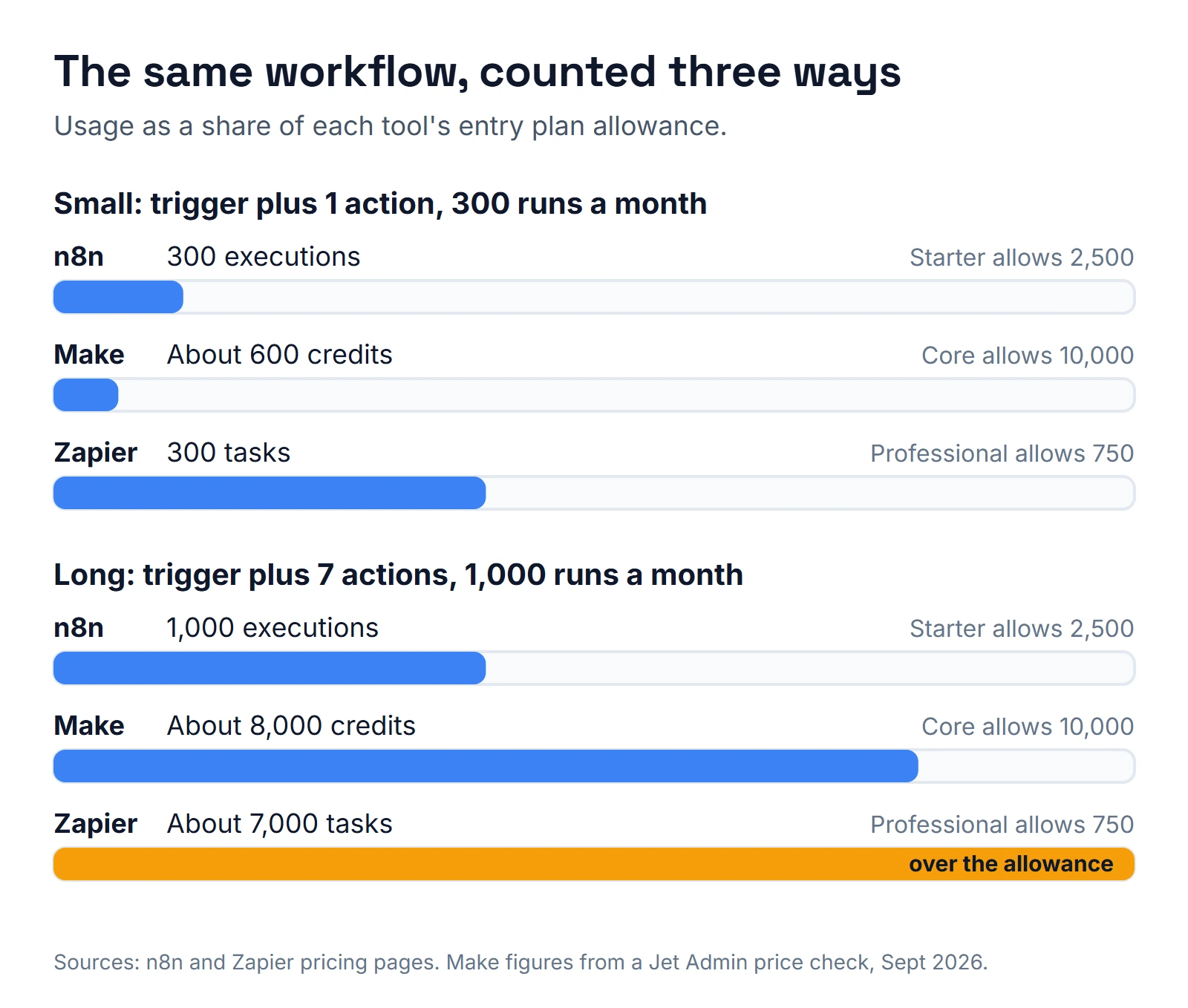
| Workflow | n8n | Make | Zapier |
|---|---|---|---|
| Trigger plus 1 action, 300 runs a month | 300 executions | About 600 credits | 300 tasks |
| Trigger plus 7 actions, 1,000 runs a month | 1,000 executions | About 8,000 credits | About 7,000 tasks |
| Entry plan allowance | 2,500 on Starter | 10,000 on Core | 750 on Professional |
The small workflow fits every entry plan. The long one needs a much higher Zapier tier than the entry one. Short workflows favor Zapier's meter, and long ones favor n8n's. For rates and running costs on the developer side, see how much does an n8n developer cost.
What did the brokerage bridge look like after the move?
I did not move everything. I moved the status and new-loan logic to n8n, with a guard that ignores stale events by comparing stage order and status date. The Zaps that stayed live went to the vendor's new app version before the deprecation deadline.
Then I added what neither tool gave for free. An intent ledger and a reconciler run every 5 minutes and alert when no LOS ID lands within 15 minutes, with a retry link capped at 3 tries. Notes written from the CRM to the LOS carry an anti-echo marker so they do not bounce back. A loan-details sync every 30 minutes wrote 808 fields on 402 contacts on its first run.
n8n did not fix the silent drops. The ledger and the reconciler did.
What should I check before moving automations off Zapier?
I would check these five things, all taken from that bridge:
- IDs. Does every record carry an ID back to the other system? Only 226 of 2,032 contacts had any LOS ID.
- Filters. What happens to the records they drop? Nine disappeared in a week.
- Webhook ownership. Who owns each webhook? The notes webhook belonged to no Zap.
- Vendor deadlines. Is any app version being retired? Live Zaps had to move first.
- Arrival checks. How will you know when a record does not arrive? Mine alert after 15 minutes.
If you want that kind of review on your own tools, including the ones outside n8n, an n8n consultant inventory covers them.
What is my pick for three common situations?
- A solo owner who wants form submissions in a spreadsheet and a text alert. Zapier. The task meter is tiny and the owner can fix it alone.
- An operations person who wants a visual, branching flow across a handful of apps at moderate volume. Make, after a credit estimate.
- A service business with AI chat bots, a CRM and customers who get messaged automatically. n8n, with alerts built in from day one and guards in code. If the CRM is GoHighLevel, read gohighlevel n8n for what belongs where.
Mixing is normal. A brokerage can keep its simple Zaps and run the logic that needs IDs, guards and reconciliation in n8n, which is what happened at the brokerage above.
If you are looking for a Zapier expert or a Make.com expert, the same questions still apply: who owns the account, how does a failure reach a person, and what happens when an event arrives twice. They are the core of the interview I use for any n8n developer, and they work on builders for all three tools. Or book a call with your situation.
About the author

Carlos Familia, CRM & AI automation expert. GoHighLevel, n8n, AI agents, servers. Full-stack developer.
I build CRM systems in GoHighLevel, n8n automations on my own servers and AI voice and chat agents for service businesses. Full-stack developer: I write the workflow, the API integration, the database and the server it runs on, and I test every build with real journeys before handoff.
Book a call with Carlos
In 30 minutes we look at how you get customers today and what to automate first. Pick a time · contact@bluemiraisystems.com