GoHighLevel Facebook Lead Form: What I Found When Leads Vanished
Connect a Facebook lead form to GoHighLevel, then check the six places leads vanish: tags, a dead feed, mapping, backfills, merges and missing contact IDs.
By Carlos Familia, CRM & AI automation expert. Updated . 4 min.
I opened a Pennsylvania med spa's Facebook lead chain before building anything on it, and checked each link against live data. Of 45 recent Facebook contacts, 42 had no tag when they were created. The marketplace feed that delivered form leads had been dead for weeks, and roughly 45 form leads had gone unanswered in that time. And not one call had carried the contact ID, so nothing a call produced ever reached the CRM.
To connect a Facebook lead form to GoHighLevel, link the Page under Settings > Integrations > Facebook, map the form's fields under Facebook Form Fields Mapping, then build a workflow on the Facebook Lead Form Submitted trigger. HighLevel's trigger article recommends the Page Is and Form Is filters, because with no filters the trigger fires for any form on any connected Page. It also says to run Test Workflow before you publish. If leads still go missing, these are the places I found them.
| What I found | Count |
|---|---|
| Recent Facebook contacts with no tag at creation | 42 of 45 |
| Form leads left unanswered while the feed was dead | about 45 |
| Calls that sent the contact ID back to the CRM | 0 |
| Leads stuck behind unmapped forms at an insurance agency in Puerto Rico | 39 |
| Seconds after the webhook that a duplicate contact was merged away at a New Jersey med spa | 1 to 2 |
Why did 42 of 45 contacts have no tag?
My read is that the contact gets created first, and any tag comes later from something else, or never. Either way, a workflow that waits for a tag is waiting for an event, and re-adding a tag the contact already has does nothing. I hit that in a roofing build too.
The fix is to trigger on the form itself, using the Facebook Lead Form Submitted trigger with its filters. For the med spa I went further and polled new contacts by form ID. The full build is in the med spa speed to lead case study.
Why would the feed die without anyone noticing?
I will not guess the cause of that one. HighLevel's troubleshooting article lists the usual suspects. The Facebook connection can break after a password change, a de-authorized app, a logout or a change to page permissions, and the token also expires on its own after some time. LeadConnector's lead access can be revoked, and the Page admin who granted it has to keep their access.
The fix is a heartbeat. Check the newest lead per form every day and alert when it goes quiet. A feed that fails silently only gets noticed when someone counts.
Why does an unmapped form drop its leads?
HighLevel's trigger article says field mapping is required. At an insurance agency in Puerto Rico, the client said cancer-policy leads "weren't coming in". Two forms were unmapped. Mapping them backfilled 39 stuck leads in about three minutes.
The troubleshooting article gives a quick check: open the mapping settings and look for a blue tick beside the form. Add that check to every launch.
Why didn't the backfilled leads start my workflow?
They did not trigger workflows. The leads arrived as contacts, but no workflow ran for them.
So enroll old leads on purpose, with a cutoff date. Back at the Pennsylvania med spa, a cloned follow-up ladder would have sent messages into 38 of 100 staff-written threads, until I added a launch cutoff. Ask yourself whether a three-week-old lead should get "thanks for your interest" today. My missed call text back guide covers the wording for late replies.
Why does a fast reply go to a contact that no longer exists?
In one build, a Facebook lead created two contacts. GoHighLevel merged them 1 to 2 seconds after the webhook fired, and a fast bot reply went to the contact that was deleted.
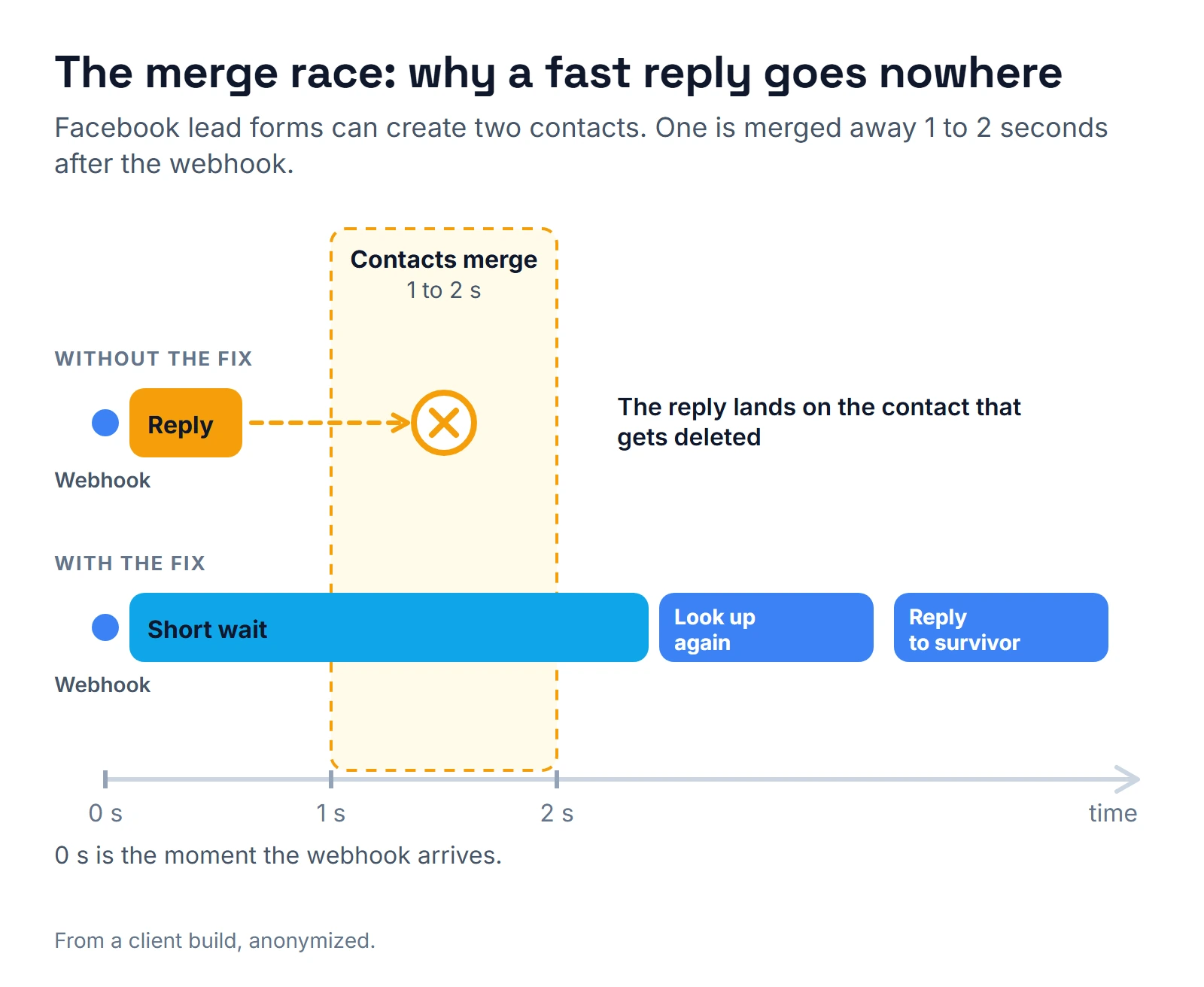
The fix is a short wait, then a fresh lookup by phone or email before the bot acts. Never trust the contact ID from the first second.
Why did the CRM never learn about the call?
No call at the med spa had ever carried the contact ID, so results had nowhere to go. Pass the ID with every dial and write the result back to the same contact. Otherwise the chat side has no idea what happened on the call.
What should you ask whoever builds yours?
- Does any trigger depend on a tag? If yes, what happens to contacts who already have it?
- What alerts me if no lead arrives for a set number of hours?
- Is every form mapped, and who rechecks after a form edit?
- What happens to old leads when a mapping is fixed?
- Does a fast reply look the contact up again before it acts?
- Can you show a test lead moving through the whole chain?
For test method, read how I test GoHighLevel workflows. Other traps are in GoHighLevel workflow mistakes, and the rest of a spa's system is in my med spa CRM guide. If you want someone to open your account the way I opened this one, see hiring a GoHighLevel expert or use the calendar below.
About the author

Carlos Familia, CRM & AI automation expert. GoHighLevel, n8n, AI agents, servers. Full-stack developer.
I build CRM systems in GoHighLevel, n8n automations on my own servers and AI voice and chat agents for service businesses. Full-stack developer: I write the workflow, the API integration, the database and the server it runs on, and I test every build with real journeys before handoff.
Book a call with Carlos
In 30 minutes we look at how you get customers today and what to automate first. Pick a time · contact@bluemiraisystems.com