n8n Lead Generation: One Pipeline, Built Step by Step
How n8n lead generation works: collect, update, enrich and deliver leads. A foreclosure pipeline I built, plus form and Instagram sources, and what broke.
By Carlos Familia, CRM & AI automation expert. Updated . 7 min.
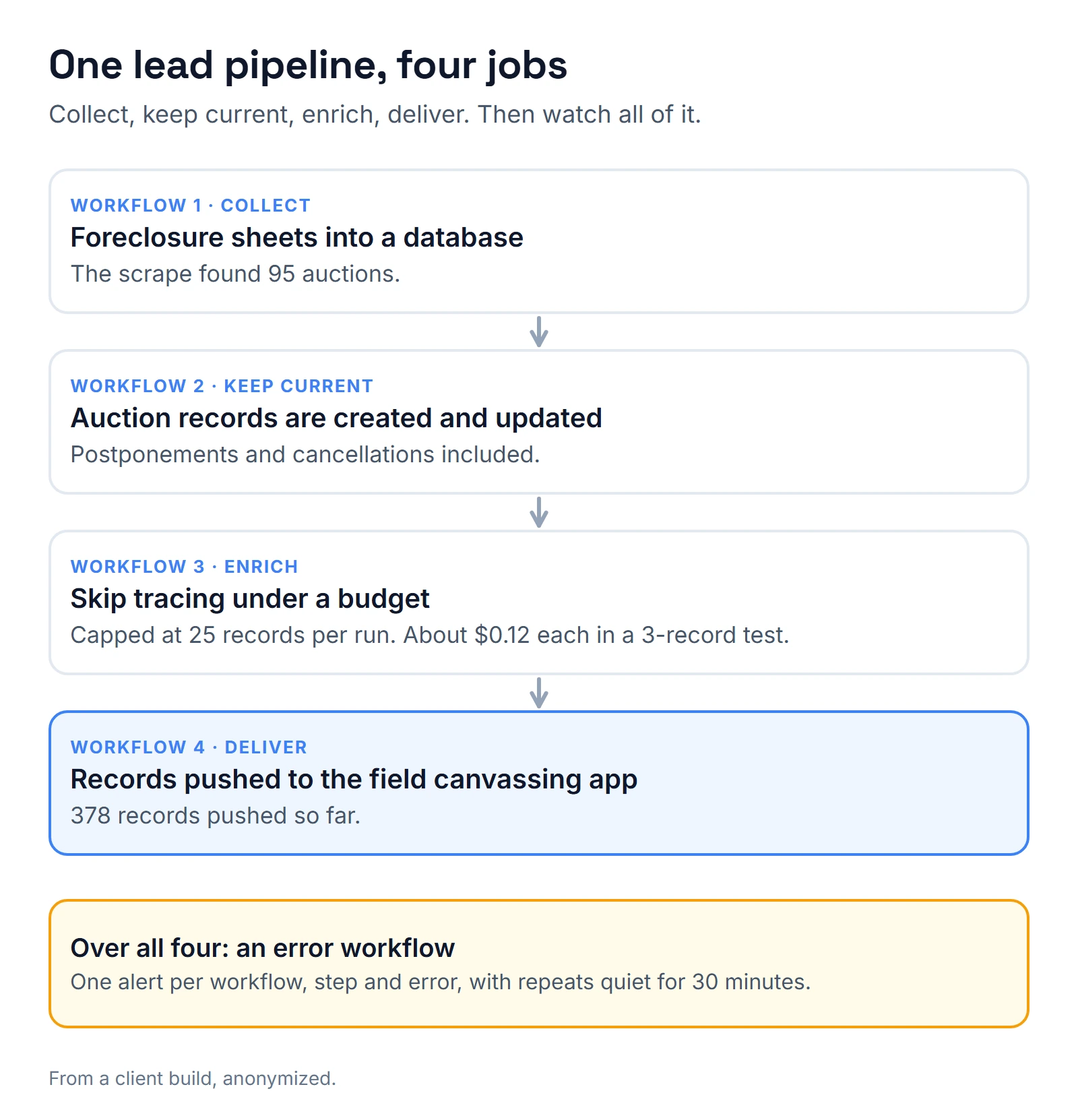
A real estate buyer in New Mexico had a door-knock and cold-call team that copied foreclosure and auction sheets by hand. I built four workflows in the client's own n8n cloud account to replace the copying: scrape the foreclosure sheets into Airtable, track auctions, enrich the owners with skip tracing, and push the records into the field canvassing app. The scrape found 95 auctions, 378 queued records have been pushed to the team's app, and the dashboard on top covers 517 records. I built the pieces in order, and most of them broke in their own way.
What is n8n lead generation? n8n doesn't create demand. It moves leads through four jobs: collect them, keep them current, enrich them, and deliver them to the place where someone acts. The sections below follow the build in that order, then show the same shape on two other lead sources.
Workflow 1: the sheets go into a database
The first workflow scrapes the foreclosure sheets and writes them into Airtable. Everything else reads from that table.
The first surprise came at deploy. Activating the workflows through n8n cloud's API did not register their triggers, so the schedules were not live. I now confirm a trigger by watching a real run, never by reading the "active" flag. Editing part of a live workflow can do the same to a webhook: it stays unregistered until you switch the workflow off and on.
Workflow 2: auctions stay current
An auction list isn't a list, it's a set of events that change. The second workflow creates and updates auction records, including postponements and cancellations, so the team isn't working from a stale list.
A smaller bug lived here. The Airtable update node was fragile, so I replaced it with a plain HTTP PATCH. If an update step is the part that fails most, make it the part that's easiest to read.
Workflow 3: enrichment runs under a budget
The third workflow enriches records with skip tracing. I cap it at 25 records per run so the cost stays predictable. In a test, all 3 records enriched at about $0.12 each, so a full 25-record run comes to roughly $3.
Finding a phone number and being allowed to call it are separate questions. Your rate will also differ by provider and by how many records match. The habit is what matters: test three, price the batch, set the cap. Then watch the first real run.
Workflow 4: records land where the team works
The fourth workflow pushes the enriched records into the field canvassing app. The app's API had two quirks: it accepted only form-urlencoded bodies, and it required phone and email fields to be present even when empty.
The 378 records already pushed are the proof the quirks are handled. If the app you push to is picky, send one record by hand and read the response before you automate.
Then: a dashboard over the data
A dashboard covers the 517 records in the table. Once several workflows write into one place, you need to know when one of them stops, which is the last section below. On a different dashboard I built, load time was 8.7 seconds until I added a stale-while-revalidate cache, which brought it to 0.46.
Second source: a website form
A private real estate lending marketplace told me "our contact form doesn't work". The truth was worse. The server route behind the form wrote each submission to a log, answered success and kept nothing, so no enquiry since launch had reached anyone. The footer "Contact" link didn't help either: a mailto link does nothing on a computer with no mail app set up.
My fix: form to n8n to an email to the founder, with the reply-to set to the sender. If the save fails, the form gets a 502, not a smiling "thanks". In n8n, the Respond to Webhook node sets that status in its options, and a Code node that throws can still send back a bare 200, so test the failure path on purpose.
Then I put a follow-up queue inside the lead tracker the founder already used, with a touches log and three buckets ("waiting on you", "over a month", "due"). Its first pass flagged 337 leads untouched for 30 days or more, 40 due and 29 recent.
Third source: Instagram
For a mortgage brokerage in Florida, the owner wanted realtors captured from Instagram without automated direct messages, because realtors block automated texts. The path: ManyChat to an edge function, then Apify profile enrichment, realtor detection, and a contact plus an opportunity plus a task in GoHighLevel. No message goes out.
Two limits shaped it. Instagram webhooks have no "follows" field, so comments, DMs and story replies are the dependable triggers. And GoHighLevel can't search contacts by custom field value, so I kept a local index. For a spreadsheet source, the same brokerage's referral upload turned a 330-row sheet into 106 agents and 325 referrals, and re-uploading the file created 0 new records.
Last: every piece reports its own failures
n8n has a built-in answer. You create a workflow that starts with an Error Trigger node, then pick it under Error workflow in each workflow's settings. n8n's error handling docs say one error workflow can serve several workflows, and it receives the execution link, the error message and the last node that ran.
On the brokerage's instance I put that on all 33 active workflows, alerting once per workflow, step and error combination, then staying quiet on repeats for 30 minutes. The error workflow itself has to be published, or it never fires. An hourly watchdog also looks for workflows that were switched off.
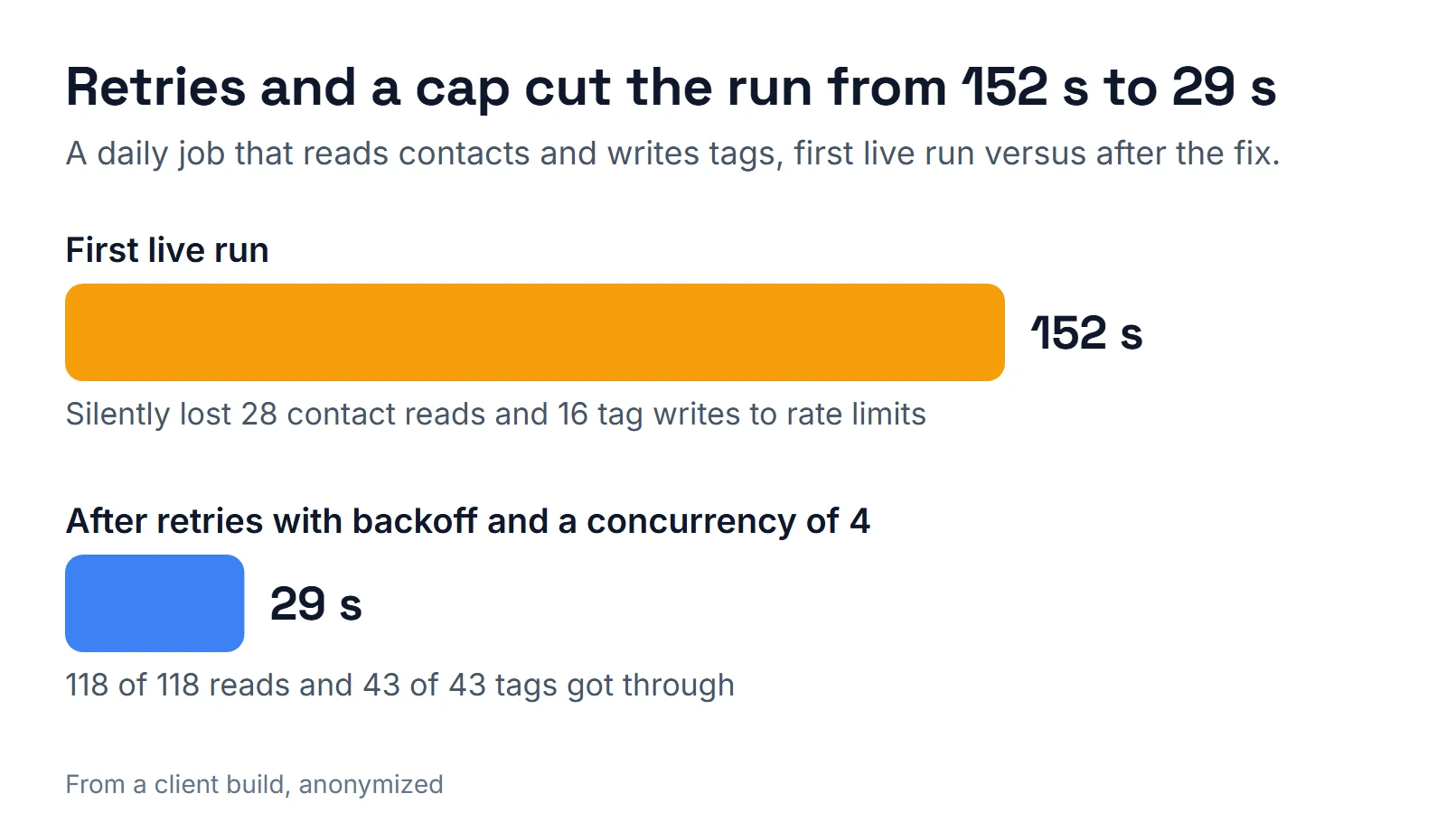
Rate limits fail more quietly. On its first live run, a daily call-list job there dropped 28 contact reads and 16 tag writes on HTTP 429 responses and still finished. Now its result carries failure counters, so a finished run shows what it dropped. Retries with backoff and a concurrency cap of 4 got every read (118) and every tag (43) through, in 29 seconds instead of 152. Another hard limit: a Code node gets 300 seconds in total, even in per-item mode, so split big jobs into batches. And in some Code node sandboxes, $helpers and new URL() don't exist, while a bare catch hides the error. At one point, a test workflow on a seconds-long cron flooded an instance's execution history down to about 2 days.
What would I change?
- Count executions before you pick a schedule. n8n's pricing page lists Cloud Starter at 20 euros a month for 2,500 executions and Pro at 50 euros for 10,000 (billed annually). A poll every 20 seconds is about 4,300 runs a day, so check how your plan counts executions, or use a webhook. I compare running costs in how much an n8n developer costs.
- Check the email rules before you email scraped leads. The FTC's CAN-SPAM guide requires accurate headers, a physical address and an opt-out honored within 10 business days, with penalties up to $53,088 per email. Calling lists have separate rules; see the calling section of the real estate investor CRM checklist.
- Pick the source of truth first. Airtable holds the foreclosure data, and the lending marketplace's queue lives inside the tracker it already had. I'd settle that question before building a single workflow.
- Read every sheet. The brokerage's parser first read only the first sheet of each workbook.
- Test the failure path of every form. Submit it, break the save, and see what the visitor sees.
If you want to see what breaks in AI-driven flows, read n8n AI agent lessons. If you want help choosing who builds this, read how to hire an n8n developer or see what belongs in GoHighLevel and what belongs in n8n. For the voice side of follow-up, see AI voice agents for real estate. To talk through your own sources, pick a slot on the calendar below.
About the author

Carlos Familia, CRM & AI automation expert. GoHighLevel, n8n, AI agents, servers. Full-stack developer.
I build CRM systems in GoHighLevel, n8n automations on my own servers and AI voice and chat agents for service businesses. Full-stack developer: I write the workflow, the API integration, the database and the server it runs on, and I test every build with real journeys before handoff.
Book a call with Carlos
In 30 minutes we look at how you get customers today and what to automate first. Pick a time · contact@bluemiraisystems.com