Solar CRM: GoHighLevel vs Aurora, OpenSolar and Enerflo
Solar CRM comparison of GoHighLevel, Aurora Solar, OpenSolar and Enerflo, read from each vendor's own pages, plus lessons from a tested GoHighLevel solar demo.
By Carlos Familia, CRM & AI automation expert. Updated . 7 min.
In an r/solar thread where an installer vented about HubSpot, the owner of a smaller solar company replied with their own stack: OpenSolar, Scanifly, SalesRabbit, QuickBooks, DocuSign, several finance portals and more. Their CRM was EspoCRM, chosen because it is open source and allows unlimited users, but what they really wanted was an ERP. They had tested Salesforce, Zoho and several solar tools and found nothing that fit solar off the shelf. Their verdict: "So we limp along doing what we can for now."
That is the buyer this comparison is for. Four names come up: Aurora Solar, OpenSolar, Enerflo and GoHighLevel. They are not four versions of the same thing. The table shows what each one leads with, read from the vendors' own pages on October 14, 2026.
| Tool | What its page leads with | Price shown |
|---|---|---|
| Aurora Solar | Design and sales software: roof modeling, shading analysis, interactive proposals with financing, contracts with e-signature, plan sets | Basic $159 per user a month billed monthly ($135 billed annually), Premium $259, Enterprise custom |
| OpenSolar | Free software to design, sell and manage projects: leads, design, proposals, e-signature, project management CRM | "100% Free of charge" |
| Enerflo | An operating system for residential solar that connects your existing tools, from first contact to permission to operate | Pricing through a discovery call |
| GoHighLevel | CRM, pipelines, workflows, calendars, messaging and AI agents | Starter $97 a month, usage billed on top |
Short answer: Aurora, OpenSolar and Enerflo are built around designing and selling a system and managing the install. GoHighLevel is built around the conversation before and after: lead replies, booking, nurture and reminders.
One disclosure before the details. I have not run a live solar installer on GoHighLevel. My solar experience is a demo account I built and tested, and I describe it below.
Pick Aurora Solar when design and proposals are the bottleneck
Aurora's page describes roof modeling, panel placement, shading analysis and code-compliant layouts. Its Sales Mode proposals show cash, loan, TPO and prepaid TPO options side by side. It also lists drone data upload for roof maps, contract generation with e-signature through Docusign, and plan sets and racking design with an automatic bill of materials. A customer quote on the same page credits Aurora's Lead Capture AI with more web leads, so the top of the funnel is part of its offer too.
It says it has pre-built integrations with leading CRMs, but doesn't name them. That is the natural seat for a lead tool such as GoHighLevel. I would check which CRM connection fits your plan before assuming anything.
Pick OpenSolar when budget is tight and you want a CRM inside the design tool
OpenSolar's page lists leads, auto design, proposals, integrated finance, e-signature, permitting integrations, teams and a project management CRM, and it calls the software free of charge. Its API and enterprise services appear separately as add-ons. That makes it the sensible default for a small installer. I wouldn't tell a three-person team to pay for a second CRM before they have used the one included here.
The question to ask is the one this post is about: does the included CRM follow up with a lead on a Sunday evening, by text, without a person doing it? Test that in a trial.
Pick Enerflo when you want the whole path in one flow
Enerflo's page lists a leads and deals pipeline, a "Virtual Sales Rep" that captures leads around the clock, 3D design through partners such as Aurora Solar and Solargraf, and financing that routes deals across lenders, with escrow for cash deals. It also lists an Install Tracker with configurable milestones and automated customer communications, plus e-signature packets.
It describes itself as connecting your tools instead of replacing them, and it says it is available only to US-based residential solar companies. If you want financing, contracts and install tracking in one place, my view is that adding GoHighLevel on top would double up some pieces.
Pick GoHighLevel when leads go quiet between the form and the appointment
This is where I'd use it, and where my demo testing applies. Three lessons matter for solar:
- Tag first, then move the stage. If you move the stage before adding the guard tag, the stage workflow fires before the tag exists and can message twice.
- Re-adding an existing tag starts nothing. A tag trigger reacts only to a tag the contact didn't have, so remove it first.
- Plan for repeat customers. A homeowner who bought panels may come back for a battery. GoHighLevel can refuse a second opportunity for the same contact in a pipeline, even when the first one is won. On a mortgage account, the setting that allows it switched itself off within about two hours.
Speed is the other reason. For a med spa in New Jersey, the baseline before I built anything was a median first response of 36 seconds. The 90th percentile was 73 minutes, and 2 leads in 14 days were never answered. Averages hide the slow tail, and the slow tail is where leads go cold.
If you use an AI caller, check the hours. The one I built for a med spa only dials between 8 am and 9 pm in the lead's time zone, worked out from the area code. A missed call text back covers the calls you can't answer, once texting is registered. See the GoHighLevel A2P 10DLC guide for that step.
How does GoHighLevel connect to the other three?
Through their APIs, if you use them. Aurora lists an API with its enterprise tools, OpenSolar lists one as an add-on, and Enerflo lists an open API and integrations with all major CRMs. Check which plan includes access before you design anything around it.
The route I'd use is a workflow webhook out of GoHighLevel into n8n, with n8n calling the design tool's API. Two things trip people up. The workflow webhook step sends the whole contact and nests your custom data under one key. And a bridge that reads many contacts at once will hit rate limits.
On a mortgage build, the first live run silently lost 28 contact reads and 16 tag writes to 429 errors. After I added retries with backoff and limited concurrency to 4, the run read 118 of 118 contacts and wrote 43 of 43 tags. The run time fell from 152 seconds to 29.
If you want a starting pipeline, this is my suggestion, not a record of a client build: new lead, contacted, appointment set, appointment held, proposal sent, signed, installed, review asked. Keep it that short until your data shows you need more stages.
What does the solar demo actually contain?
The solar demo is one of eight niche accounts I built. It has a solar pipeline, custom fields, 30 made-up test contacts that can't receive real messages, and 69 workflows across four systems:
- Calendar-driven confirmations, reminders and no-show handling, with missed call replies and pipeline moves
- An email marketing system
- Conversion tracking, left in draft
- An SMS system in five phases, with a pause loop, a duplicate guard and an English and Spanish language router
The journey tests follow every branch, and in one round 268 of them passed across the eight accounts. The method is in how I test GoHighLevel workflows. It is a tested demo build, not a record of a live solar company's results, and I'm not claiming any.
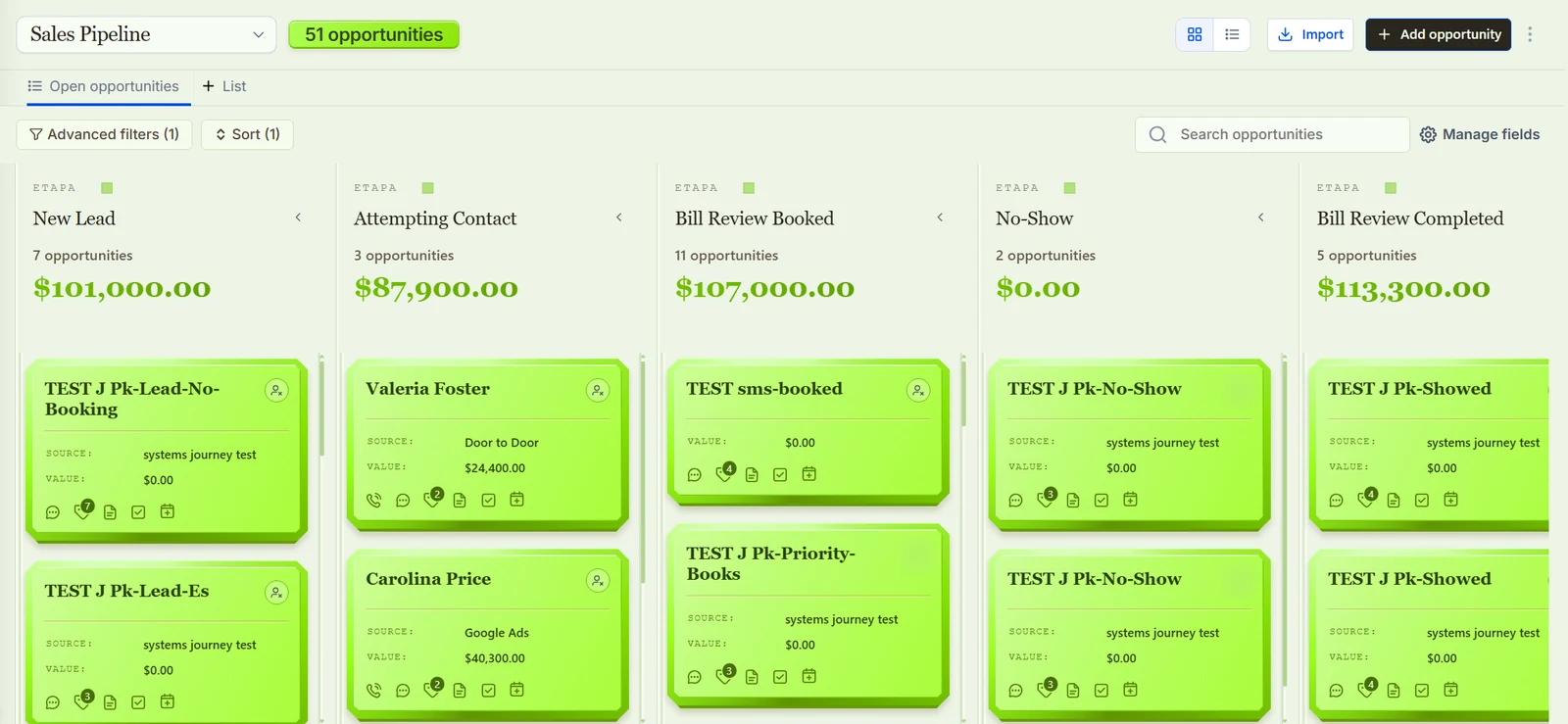
Testing showed what breaks before real leads arrive. A failed publish leaves a draft with the same name. During a wait, the log keeps adding "success" rows, so reading only the latest row tells you nothing about where the contact really is. Tag-triggered workflows start late when many contacts arrive at once. And builds and journey tests running on the same session killed each other.
Testing also changed the build. My first SMS system was rejected because it didn't match the proven five-phase design, so I rebuilt it.
What should I test before paying for any of them?
Run the same four checks in every trial:
- Submit a test lead in the evening and time the first reply.
- Reply to the follow-up and confirm the sequence stops.
- Add the same contact again as a repeat customer and see whether a second opportunity is created or refused.
- Ask what happens to a lead that never answers: how many touches, over how long, and who is told at the end.
If a vendor can't answer the fourth question in writing, treat its follow-up as basic.
My pick for three common situations
- A small installer with a tight budget: OpenSolar first. Add GoHighLevel only when you can point to leads that went quiet.
- A design-led residential sales team: Aurora Solar for design and proposals, with GoHighLevel in front for replies, booking and nurture. Confirm Aurora's CRM integration first.
- A dealer or installer wanting financing, contracts and install tracking together: Enerflo, and skip GoHighLevel unless lead follow-up is leaking.
If you pick GoHighLevel and want a head start, the solar Automation Pack is the demo's system as a GoHighLevel snapshot, for $22. For similar field-sales setups, read roofing CRM and HVAC CRM. You can also book a call and I'll tell you honestly whether you need GoHighLevel at all.
About the author

Carlos Familia, CRM & AI automation expert. GoHighLevel, n8n, AI agents, servers. Full-stack developer.
I build CRM systems in GoHighLevel, n8n automations on my own servers and AI voice and chat agents for service businesses. Full-stack developer: I write the workflow, the API integration, the database and the server it runs on, and I test every build with real journeys before handoff.
Book a call with Carlos
In 30 minutes we look at how you get customers today and what to automate first. Pick a time · contact@bluemiraisystems.com